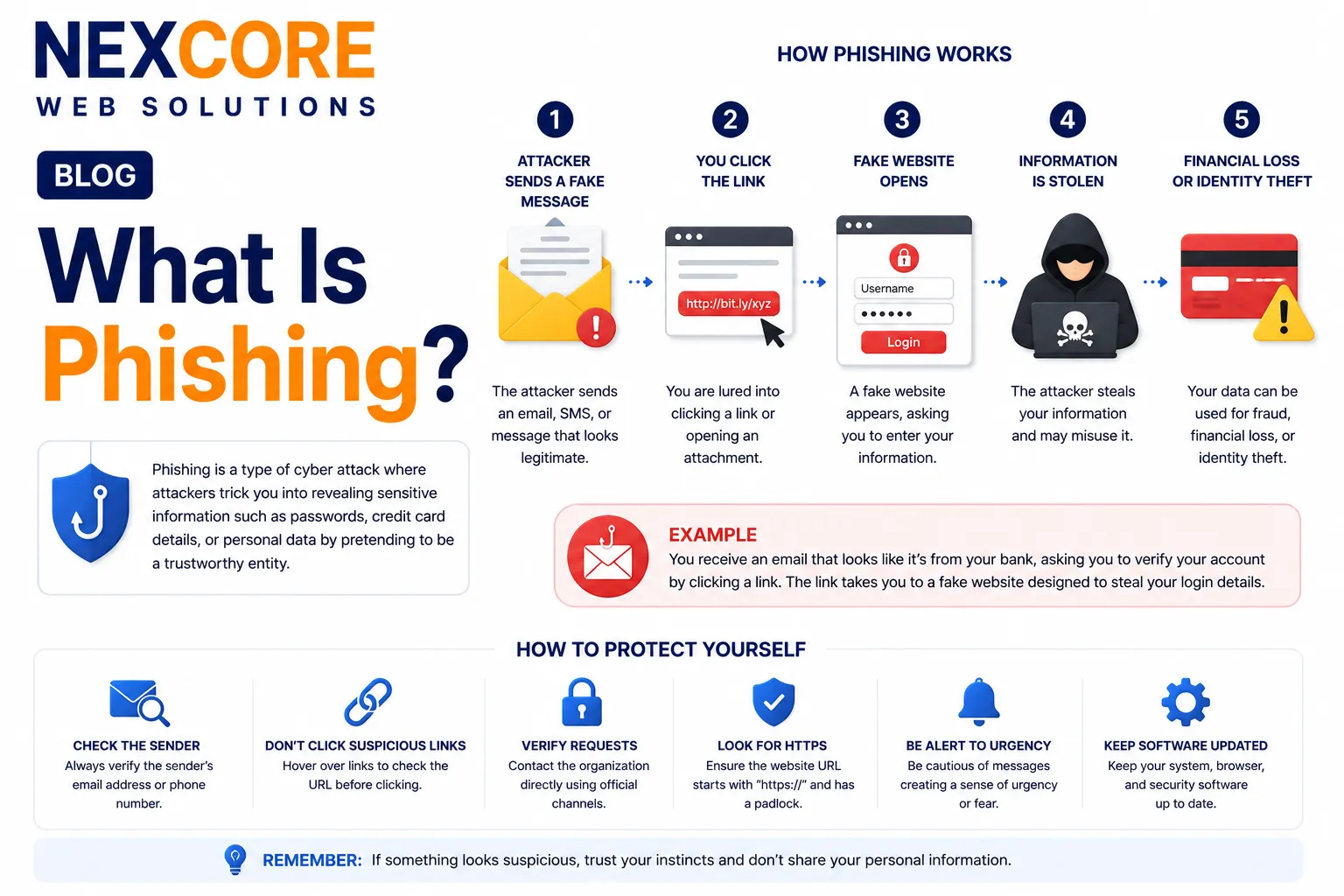
Phishing is a type of cyberattack in which criminals impersonate a trustworthy person, company, service, or organization to trick people into revealing sensitive information or taking an unsafe action. Attackers may attempt to steal passwords, payment details, account credentials, personal information, or access to business systems. Phishing commonly arrives through email, text messages, social media, phone calls, or fake websites, making it a threat that can affect almost anyone who uses digital services. The attack does not necessarily depend on sophisticated technical vulnerabilities because it often targets human trust and attention. A message may create urgency, fear, curiosity, or excitement to encourage a quick response. Understanding how phishing works can help individuals and organizations recognize suspicious communication before it causes real damage.
How Does Phishing Work?
A phishing attack usually begins when an attacker creates a deceptive message designed to look legitimate. The message may imitate a bank, employer, delivery company, online marketplace, government agency, or familiar technology service. It might ask the recipient to click a link, open an attachment, confirm an account, reset a password, or provide personal information. Once the victim follows the instructions, the attacker may capture credentials, install malicious software, redirect the victim to a fraudulent website, or persuade them to transfer money.
Creating a Sense of Urgency
Many phishing messages attempt to make people act before they have time to think carefully. A message might claim that an account will be suspended, a payment has failed, or an important document requires immediate approval. Attackers use urgency because rushed decisions are more likely to bypass normal verification habits. Taking a moment to independently verify an unexpected request can significantly reduce the chance of falling for this technique.
Common Types of Phishing
Email Phishing
Email phishing is one of the most recognizable forms of the attack. Criminals send messages that imitate legitimate organizations and often include links to fake login pages or malicious attachments. The email may use company logos, familiar language, and realistic formatting to appear genuine. Checking the sender address, avoiding unexpected attachments, and independently visiting the organization’s official website can help users verify suspicious messages.
Smishing
Smishing is phishing conducted through SMS or other text messaging services. A fraudulent message may claim that a package cannot be delivered, a bank account needs verification, or a payment requires attention. Because people often expect short messages to be informal, they may overlook warning signs. Users should avoid clicking unexpected links in text messages and instead verify requests through an official application or website.
Vishing
Vishing, short for voice phishing, uses phone calls or voice messages to manipulate victims. Attackers may impersonate bank employees, technical-support agents, government representatives, or company executives. They can use personal information obtained from other sources to make the conversation sound convincing. People should be cautious when callers request passwords, one-time codes, remote computer access, or urgent financial transfers.
Spear Phishing
Spear phishing is more targeted than ordinary phishing because the attacker researches a specific person or organization before sending the message. A criminal may use information from public profiles, company websites, or previous communications to create a highly believable request. For example, an employee might receive an email that appears to come from a manager asking for sensitive documents. Because targeted messages can look realistic, verification procedures are particularly important.
How to Recognize a Phishing Message
Phishing attempts can contain several warning signs, although sophisticated attacks may avoid obvious mistakes. Unexpected requests for passwords, payment information, verification codes, or sensitive documents deserve extra attention. Suspicious links, unusual sender addresses, unexpected attachments, pressure to act immediately, and requests that bypass normal procedures can also indicate a potential phishing attempt. However, perfect spelling or professional design does not prove that a message is genuine, so users should verify the request through an independent channel.
Check Links Carefully
Before clicking a link, users can inspect its destination without opening it, depending on the device and application. A legitimate-looking message may contain a link that leads to a domain with a slightly altered spelling or unfamiliar address. Attackers can also use shortened links or other redirection techniques to conceal the final destination. When in doubt, manually enter the organization’s known website address or use its official application instead of following the message link.
Phishing and Fake Login Pages
One common phishing technique is creating a website that closely resembles a legitimate login page. The fake page may copy branding, colors, images, and layout from a real service. When a victim enters a username and password, the information can be sent directly to the attacker rather than the legitimate service. Using password managers and multi-factor authentication can provide additional protection, although users should still verify websites and requests carefully.
How to Protect Against Phishing
Strong phishing protection combines technology with user awareness. Individuals should use unique passwords, enable multi-factor authentication, keep software updated, and avoid opening unexpected attachments or links. Organizations can supplement these practices with email filtering, domain protection, security awareness training, authentication controls, and monitoring. Clear procedures for verifying financial or sensitive requests can also prevent attackers from exploiting normal business processes.
What to Do After Clicking a Phishing Link
If someone accidentally clicks a suspicious link, they should not panic or continue interacting with the page. If credentials were entered, the affected password should be changed promptly from the legitimate service, and other accounts using the same password should be reviewed. If financial information was submitted, the relevant financial institution should be contacted through an official channel. Organizations should also report suspected incidents internally so security teams can assess potential exposure.
Why Phishing Remains Effective
Phishing remains effective because it targets human behavior rather than relying entirely on technical weaknesses. Attackers can adapt messages to current events, business processes, popular services, and personal circumstances. Even technically experienced users can make mistakes when they are distracted or under pressure. Regular awareness training, clear verification procedures, and a workplace culture that encourages people to report suspicious messages can reduce this risk.
Conclusion
Phishing is a deceptive cyberattack that attempts to manipulate people into revealing information, clicking harmful links, opening malicious files, or performing unauthorized actions. It can appear through email, text messages, phone calls, social media, and highly targeted communications. Recognizing suspicious requests is important, but users should not rely on obvious spelling mistakes or poor design as the only warning signs. Independent verification is often the safest approach when a message requests sensitive information or urgent action. Strong passwords, multi-factor authentication, security tools, software updates, and employee awareness provide additional protection. If a phishing mistake occurs, acting quickly can limit the potential damage and help security teams respond effectively.
FAQs
1. What is phishing in simple words?
Phishing is a scam in which an attacker pretends to be a trustworthy person or organization to trick someone into providing information or taking an unsafe action. The attacker may request passwords, payment details, verification codes, or personal information. Phishing can arrive through email, SMS, phone calls, social media, or fake websites and often uses urgency or fear to influence the victim.
2. How can I tell if an email is phishing?
Look for unexpected requests, suspicious sender addresses, unusual links, unfamiliar attachments, urgent language, and requests for passwords or financial information. However, sophisticated phishing emails can appear highly professional and may contain few obvious mistakes. Instead of trusting the message alone, independently verify the request by contacting the organization through a known phone number, official website, or legitimate application.
3. What should I do if I clicked a phishing link?
If you clicked a suspicious link, avoid entering additional information and close the page if appropriate. If you entered a password, change it immediately through the legitimate website and update any other account using the same password. If financial information was provided, contact the relevant institution through an official channel. You should also report the incident to your organization’s security team when applicable.
4. Can phishing happen through text messages?
Yes. Phishing through text messages is commonly called smishing. Attackers may send fake delivery notifications, payment alerts, account warnings, or other messages containing malicious or deceptive links. Because text messages often appear short and informal, recipients may trust them quickly. Avoid clicking unexpected links and verify important requests through the organization’s official website or application instead.
5. Does multi-factor authentication prevent phishing?
Multi-factor authentication can significantly reduce the impact of stolen passwords, but it does not eliminate every phishing risk. Some attacks attempt to trick users into revealing authentication codes or approving fraudulent login requests. Strong authentication methods, combined with careful verification and security awareness, provide better protection. Users should never share one-time authentication codes with someone who unexpectedly asks for them.