Retrieval-Augmented Generation, commonly called RAG, is a practical way to build AI applications that can answer questions using a specific collection of documents instead of depending only on a language model’s general knowledge. A local RAG pipeline takes this concept further by keeping document processing, vector search, and often model inference on a local machine or private infrastructure. This can be useful for confidential documents, internal knowledge bases, research notes, technical manuals, and offline experiments. LangChain can help organize the retrieval and generation workflow, while ChromaDB can provide vector storage and similarity search for document embeddings. Together, they form a useful architecture for developers learning how modern AI search systems work. Understanding the complete pipeline is more important than simply connecting two libraries.
What Is a Local RAG Pipeline?
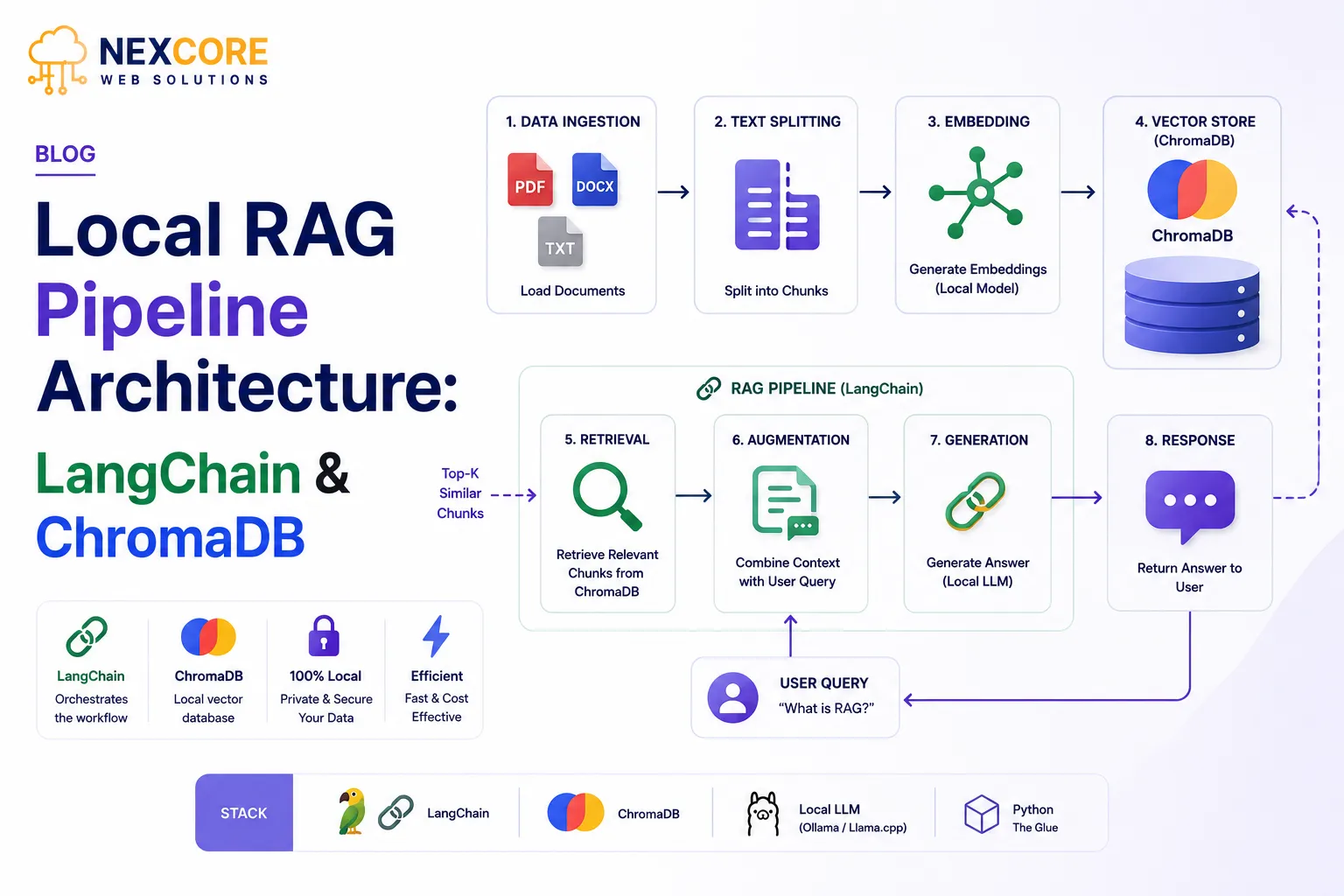
A local RAG pipeline generally contains several stages that work together. Documents are collected from files or other sources, cleaned, divided into smaller chunks, converted into embeddings, and stored in a vector database. When a user submits a question, the system embeds the query, searches for relevant chunks, and sends those results as context to a language model. The model then generates an answer based on the retrieved information.
Why Local Processing Matters
Keeping the pipeline local can provide greater control over data and network dependencies. Sensitive company documents can remain on an internal system instead of being sent to an external retrieval service, depending on the model and infrastructure being used. Local deployment can also make experimentation easier because developers can modify components without depending on remote APIs for every stage. However, local systems still require careful access control, storage protection, and resource planning.
The Main Components
Document Ingestion
The first stage converts source material into usable application data. Files may include PDFs, Markdown documents, text files, HTML pages, office documents, or internal knowledge-base exports. A robust ingestion process should extract text reliably, remove unnecessary formatting, and preserve useful metadata such as filenames, document dates, categories, and source locations. Good ingestion directly affects retrieval quality later.
Text Chunking
Large documents are usually divided into smaller chunks before embedding. If chunks are too large, retrieval may return unnecessary information and consume excessive context space. If they are too small, useful relationships between sentences or sections may be lost. Chunk size should therefore reflect the structure of the source documents and the questions users are expected to ask.
Using ChromaDB for Vector Search
Embeddings and Similarity
An embedding model converts text into numerical vectors that represent semantic relationships. Similar concepts produce vectors that are closer together according to the chosen similarity method. ChromaDB can store these vectors along with the original text and metadata, allowing the application to retrieve relevant passages when a query arrives. The quality of embeddings has a major influence on the usefulness of retrieval results.
Metadata Filtering
Vector similarity is not always enough for reliable retrieval. Metadata can narrow results by document type, department, project, date, language, or other attributes before or during the search process. For example, an internal support assistant could prioritize troubleshooting documents from the correct product version. Combining semantic similarity with metadata filters can improve precision and reduce irrelevant context.
Connecting LangChain
Building the Retrieval Workflow
LangChain can help developers connect document loaders, text splitters, embedding models, vector stores, retrievers, and language models into a structured workflow. Instead of implementing every integration manually, developers can compose reusable components that represent the major stages of the RAG pipeline. This makes experimentation easier when comparing retrieval strategies or changing model providers. The abstraction is useful, but developers should still understand what happens underneath.
Creating a Retriever
A retriever accepts a user query and returns relevant document chunks from the indexed data. In a simple RAG system, the query is converted into an embedding and compared against vectors in ChromaDB. The highest-ranked results are then passed into the generation stage as context. Retrieval settings such as the number of results, similarity threshold, and metadata filtering strongly influence answer quality.
The Generation Layer
Passing Context to a Local Model
After retrieval, the selected chunks are inserted into a prompt given to a language model. A local model can generate the final answer without sending the retrieved document content to a remote provider, assuming the entire inference stack is local. The prompt should clearly distinguish retrieved evidence from the user’s question and instruct the model to avoid unsupported claims. Better context usually produces better answers than simply increasing prompt length.
Handling Missing Information
A good RAG system should not pretend that it knows something that was not found in the indexed sources. The generation prompt can instruct the model to state when the available context does not contain enough information to answer confidently. This behavior helps reduce hallucinations and gives users a more honest experience. Source citations or document references can also make generated answers easier to verify.
Performance Optimization
Local RAG performance depends on several factors, including embedding speed, vector search latency, chunk count, model size, storage performance, and available CPU or GPU resources. Developers can improve responsiveness by reducing unnecessary retrieval results, caching repeated queries, selecting efficient embedding models, and keeping prompt context focused. ChromaDB indexing and metadata design should also be reviewed as the document collection grows. Optimization should be based on measured workloads rather than assumptions.
Security and Data Management
Local deployment does not automatically mean secure deployment. Document directories, vector databases, model files, logs, and application APIs may contain sensitive information and should be protected with appropriate permissions. Developers should also consider document retention, deletion, access controls, and tenant isolation when building systems for multiple users. A RAG application should retrieve only information the current user is authorized to access.
Testing Retrieval Quality
Testing a RAG pipeline requires more than checking whether the language model produces fluent responses. Developers should create representative questions and evaluate whether the correct documents are retrieved, whether relevant context appears near the top of results, and whether generated answers are supported by that context. Poor retrieval can cause incorrect answers even when the language model itself performs well. Retrieval evaluation should therefore be treated as a separate engineering task.
Conclusion
A local RAG pipeline built with LangChain and ChromaDB provides a practical foundation for developing private, document-aware AI applications. The architecture connects document ingestion, chunking, embeddings, vector search, retrieval, and generation into a single workflow that can run under local or controlled infrastructure. Successful implementation depends less on simply installing the libraries and more on designing strong data preparation, retrieval rules, security controls, prompt behavior, and evaluation methods. Developers should begin with a small document collection, measure retrieval quality, and gradually introduce metadata filtering, caching, better embeddings, and more advanced workflows. With careful architecture, local RAG can become a reliable foundation for internal search, document assistants, research tools, and knowledge-driven applications.
FAQs
1. What is a local RAG pipeline?
A local RAG pipeline is an AI architecture that retrieves relevant information from locally stored or privately managed documents before passing that information to a language model. The main stages typically include document ingestion, chunking, embeddings, vector storage, similarity search, and answer generation. Keeping these components local can provide greater control over data and infrastructure.
2. Why use ChromaDB in a RAG application?
ChromaDB can store document embeddings and associated metadata, making it possible to perform similarity-based retrieval when users submit questions. It is useful for local development and applications that need a vector database without depending on a large external infrastructure stack. Metadata filtering can also improve retrieval precision for structured document collections.
3. What role does LangChain play in RAG?
LangChain helps developers organize the different components involved in a RAG workflow. It can connect document loaders, text splitters, embedding models, vector stores, retrievers, prompts, and language models into a structured pipeline. This makes experimentation and integration easier while allowing developers to replace individual components without redesigning the entire application.
4. How can local RAG reduce hallucinations?
Local RAG can reduce hallucinations by supplying a language model with relevant source material before it generates an answer. However, retrieval quality is critical because irrelevant or incomplete context can still produce incorrect responses. Developers should also instruct the model to acknowledge when sufficient evidence is unavailable and provide source references whenever practical.
5. Can LangChain and ChromaDB be used for private company documents?
Yes, they can be used as components in private document-search applications, provided the complete deployment is designed securely. Developers should protect document storage, vector databases, model endpoints, logs, and user access. For multi-user systems, retrieval must also enforce document-level permissions so users cannot receive information they are not authorized to access.