Git makes collaborative software development possible by allowing multiple developers to work on different features while maintaining a shared history of changes. As teams work in parallel, branches eventually need to be brought together, and this is where Git merge and Git rebase become important. Both commands integrate changes from one branch into another, but they produce different commit histories and require different conflict-resolution workflows. Understanding the difference is essential for developers working on individual projects as well as large engineering teams. A thoughtful branching strategy can reduce confusion, make code reviews easier, and keep repositories maintainable over time. Choosing between rebase and merge should therefore depend on the team’s collaboration model, repository conventions, and whether preserving an exact historical record is more important than maintaining a cleaner commit timeline.
Understanding Git Merge
What Git Merge Does
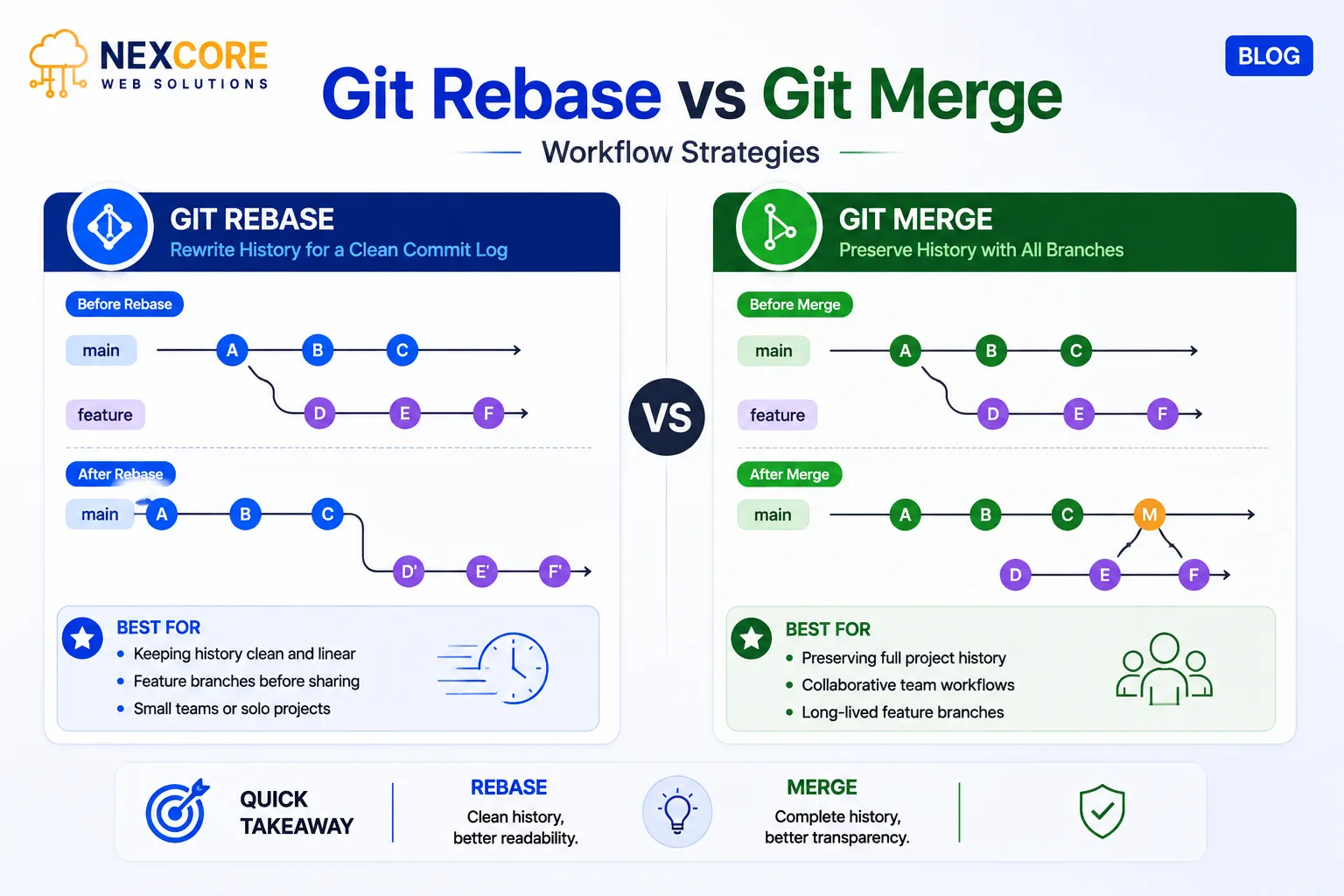
Git merge combines the histories of two branches by creating a new merge commit when the branches have diverged. Suppose a developer creates a feature branch from main and several changes are added to both branches. Running git merge main from the feature branch brings the latest main-branch history into the feature branch while preserving the original commits. The resulting history clearly shows that separate lines of development existed and were later integrated.
Benefits of Merge
One major advantage of merging is that it preserves the actual history of collaboration. Teams can see when branches diverged, when they were integrated, and which commits belonged to each line of development. This can be valuable for auditing, debugging, and understanding complicated release histories. Merge is also easier to use safely on branches already shared with other developers because it does not rewrite existing commit identities.
Understanding Git Rebase
What Git Rebase Does
Git rebase moves a sequence of commits to a new base, effectively creating new commit objects with a rewritten history. For example, a feature branch can be rebased onto the latest main so that the feature commits appear as though they were created after the current main branch. The resulting history is usually linear and easier to read. Rebase can therefore make feature branches cleaner before they are integrated into the main development branch.
Benefits of Rebase
A rebased history avoids unnecessary merge commits and can make tools such as git log easier to follow. Reviewers can see the feature work as a straightforward sequence of changes rather than navigating multiple branch intersections. Rebase is especially useful when developers want to update their private feature branches before opening or refreshing a pull request. It can also simplify later troubleshooting by keeping the visible history more linear.
Rebase vs Merge in Daily Workflows
Feature Branches
A common workflow is to create a branch for each feature or bug fix and regularly synchronize it with main. Teams that favor a clean history may rebase the feature branch before opening a pull request. Teams that prioritize preserving the exact branch structure may merge main into the feature branch instead. Both approaches can work well when the process is clearly documented.
Shared Branches
Rebasing becomes risky when a branch has already been pushed and other developers are building work on top of it. Because rebase changes commit history, updating the remote branch may require a force push, potentially disrupting collaborators. Shared branches should generally avoid history rewrites unless the entire team explicitly agrees on the process. Merge is usually safer for collaborative branches because it adds new history rather than replacing existing history.
Handling Conflicts
Merge Conflicts
Conflicts occur when Git cannot automatically determine which change should be retained. During a merge, Git identifies conflicting files and pauses the process until the developer resolves them. After resolving the affected files, the changes are staged and the merge is completed with a commit. The original branch history remains intact throughout the operation.
Rebase Conflicts
Rebase conflicts can require resolving similar problems multiple times if several commits touch the same areas. After each conflict is resolved, the developer continues the rebase until all commits have been replayed successfully. This can be more involved than a single merge conflict, especially when a feature branch contains many small commits. Developers should therefore understand git rebase --continue and how to abort a rebase safely when necessary.
Collaboration and Code Review
Pull Request Workflows
Teams using pull requests often prefer rebasing short-lived feature branches onto the latest main branch before review. This can reduce unrelated merge commits and make the final code history easier to understand. However, organizations with strict traceability requirements may choose merge-based workflows to preserve the branch relationships. The important factor is consistency across the development team.
Commit Quality
Rebase also creates an opportunity to clean up local development history before sharing it. Developers can combine minor fixes, reorder commits, or edit messages using interactive rebase. This can produce a more understandable sequence for reviewers. Such cleanup should generally happen before commits are published to shared branches.
When Rebase Is the Better Choice
Rebase is often appropriate when a developer is working on a private or short-lived branch and wants a clean, linear history. It is also useful when the team values readable commit timelines and encourages developers to update their branches before integration. Interactive rebase can help turn a messy sequence of experimental commits into a coherent story. The key rule is to avoid rewriting commits that other developers already depend on.
When Merge Is the Better Choice
Merge is usually preferable when preserving repository history is important or when multiple developers already share the branch being integrated. It avoids rewriting existing commit identities and provides an explicit record of when branches were joined. Merge can also be more appropriate in environments where auditability and straightforward collaboration outweigh the benefits of a perfectly linear history. It is a safe default for many shared integration workflows.
Practical Team Strategy
A practical strategy is to use rebase for local feature-branch maintenance and merge for controlled integration into shared branches. Developers can rebase their unpublished work onto the latest main, resolve conflicts early, and then submit a focused pull request. The repository can use merge commits, squash merges, or another agreed integration policy depending on team preferences. Documenting these rules prevents developers from using conflicting approaches that create unnecessary repository complexity.
Conclusion
Git merge and Git rebase solve the same fundamental problem—integrating changes—but they approach repository history very differently. Merge preserves branch relationships and adds explicit integration points, making it a dependable choice for shared work and audit-heavy environments. Rebase rewrites commit ancestry to create a cleaner, more linear history, making it valuable for private feature branches and review preparation. Neither strategy is universally superior. The best workflow depends on repository policies, branch ownership, collaboration patterns, and the team’s priorities around readability and traceability. A consistent Git strategy, combined with clear rules about when history may be rewritten, helps teams reduce conflicts, simplify reviews, and maintain a healthier codebase.
FAQs
1. What is the main difference between Git rebase and Git merge?
Git merge combines two branch histories and may create a merge commit, preserving the original branch structure. Git rebase moves commits onto a new base and rewrites their history, usually producing a more linear timeline. Merge emphasizes preserving history, while rebase emphasizes simplifying the visible sequence of commits.
2. Is Git rebase safer than Git merge?
Neither command is universally safer because they solve different problems. Rebase is safe when used on private or unpublished branches but can cause problems when rewriting history that other developers already use. Merge does not rewrite existing commits, making it generally safer for shared branches and collaborative workflows.
3. Should I rebase before creating a pull request?
Many teams rebase feature branches before opening or updating a pull request so the branch contains the latest target-branch changes and maintains a cleaner history. However, the correct process depends on team conventions. If a branch is shared with other developers, rebasing should be coordinated to avoid disrupting their work.
4. What happens if I get conflicts during a rebase?
Git pauses the rebase when it encounters a conflict that cannot be resolved automatically. You must edit the affected files, stage the corrected changes, and use git rebase --continue to proceed. If the operation becomes too complicated, git rebase --abort can return the branch to its previous state before the rebase started.
5. Can a team use both merge and rebase?
Yes. Many teams use both depending on the context. Developers may rebase private feature branches to keep them current and organized, while shared integration branches use merge-based workflows to preserve collaboration history. The important requirement is to establish clear repository rules so everyone understands which branches can be rebased and which should never have their history rewritten.