
JavaScript is widely known for its ability to build fast, interactive web applications, but its asynchronous behavior can be confusing at first. Developers often encounter unexpected execution orders when working with promises, timers, network requests, and user events. The JavaScript event loop is the mechanism that coordinates these operations while allowing a single main thread to handle many tasks efficiently. Understanding how the call stack, microtask queue, and task queue work together helps developers write predictable and responsive applications. This knowledge is especially important when debugging timing issues, improving user interface performance, or designing complex asynchronous workflows. A clear understanding of the event loop turns seemingly mysterious execution behavior into a logical and manageable process.
Understanding JavaScript’s Single-Threaded Model
JavaScript executes code on a single main thread, meaning it can perform one operation on the call stack at a time. When a function is called, JavaScript places it on the stack and removes it after the function completes. This simple model works well for synchronous code but would create problems if long-running operations blocked everything else. For example, waiting for a network response should not prevent a user from clicking a button or scrolling a page.
The runtime environment solves this problem by providing browser or server APIs that can handle asynchronous operations outside the main call stack. Timers, network requests, and certain input events can wait independently while JavaScript continues executing other code. Once an asynchronous operation is ready, its callback is scheduled for later execution. The event loop decides when that scheduled work can safely return to the main thread.
The Role of the Call Stack
The call stack is the immediate execution area for JavaScript functions. It follows a last-in, first-out structure, which means the most recently called function completes before execution returns to the function below it. A simple chain of function calls therefore executes in a predictable order. Problems arise when a function performs expensive synchronous work because the stack cannot process anything else until that work finishes.
Consider a page that runs a complex calculation directly inside a click handler. During that calculation, the browser may struggle to update the interface or respond to additional user actions. This behavior is commonly described as blocking the main thread. The event loop cannot interrupt ordinary synchronous JavaScript simply because another task is waiting.
Keeping the call stack available is therefore an important performance principle. Developers can break large operations into smaller pieces, move suitable workloads to Web Workers, or schedule non-critical work asynchronously. However, asynchronous code does not execute simultaneously on the JavaScript call stack. It simply waits until the stack becomes available and the runtime gives it an opportunity to run.
Microtasks: High-Priority Asynchronous Work
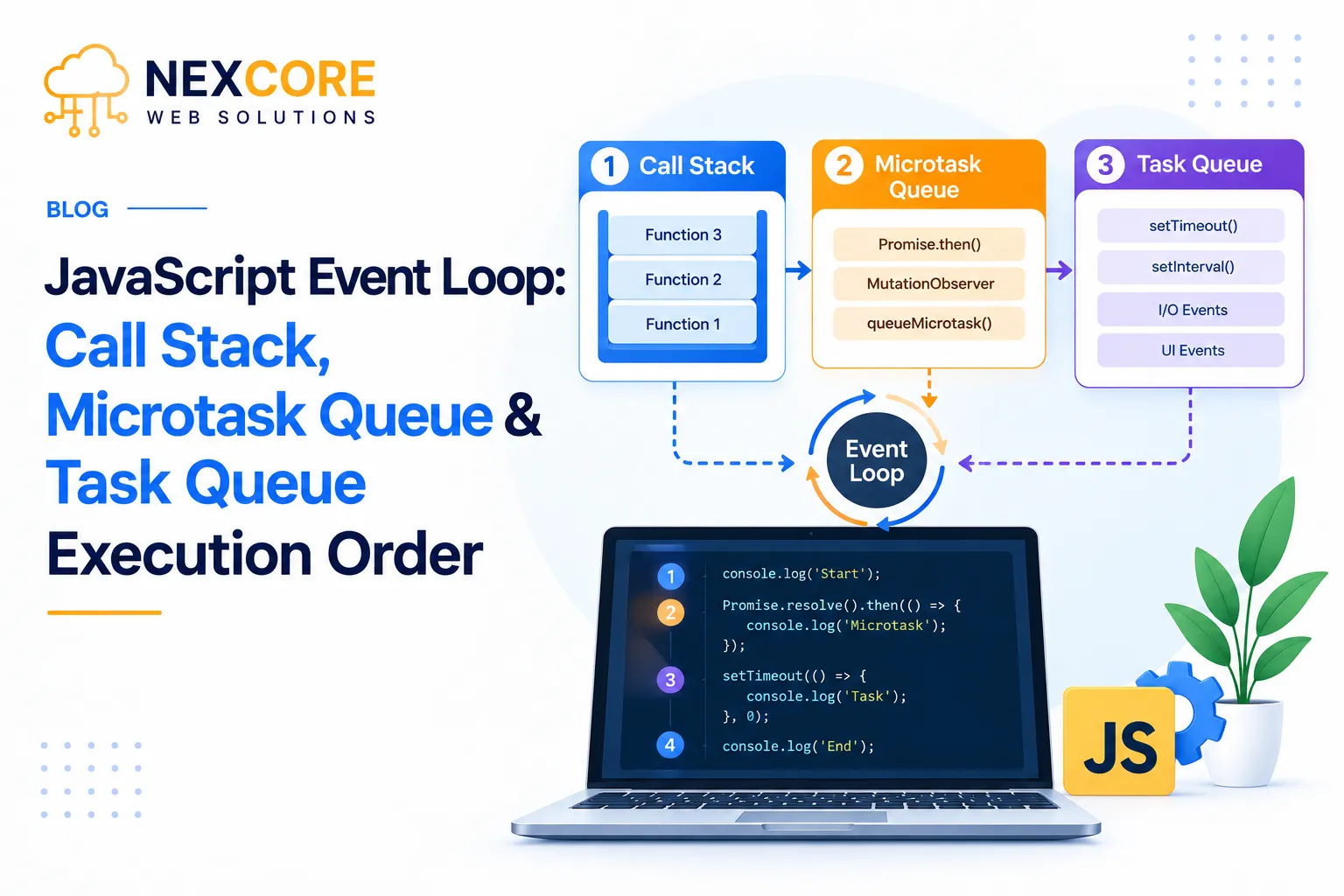
The microtask queue contains asynchronous work that receives priority after the current JavaScript operation finishes. Promise handlers created with .then(), .catch(), and .finally() commonly schedule microtasks. Browser APIs such as queueMicrotask() can also explicitly add work to this queue. In Node.js environments, additional scheduling mechanisms exist, although their exact behavior depends on the runtime.
A key rule is that JavaScript processes the current call stack before running queued microtasks. Once the stack becomes empty, the runtime drains the microtask queue before moving on to the next regular task. If a microtask adds another microtask, the newly added work is generally processed during the same microtask checkpoint. This priority explains why promise callbacks often run before timer callbacks.
For example, imagine synchronous code that creates both a resolved promise and a setTimeout callback. The synchronous statements execute first because they are already on the call stack. The promise handler then runs from the microtask queue before the timer callback gets its turn. Understanding this sequence prevents many common mistakes when developers expect timers and promises to behave identically.
The Task Queue and Regular Asynchronous Events
The task queue, often called the macrotask queue, contains broader units of scheduled work. Common examples include timer callbacks, user interface events, and some network-related callbacks. These tasks do not run immediately when they become ready. Instead, they wait until the current work and the relevant microtasks have finished.
The event loop repeatedly checks whether the call stack is empty. When it is, the runtime processes pending microtasks and then selects an available task for execution. After that task completes, the runtime checks the microtask queue again before continuing to another task. This repeated cycle keeps asynchronous operations organized without allowing multiple JavaScript functions to occupy the main stack simultaneously.
It is important to remember that setTimeout does not guarantee exact execution timing. A delay value specifies the minimum time before the callback becomes eligible to run. If the main thread is busy or higher-priority work is waiting, the actual callback may execute later. This distinction is essential when building animations, handling real-time updates, or measuring application performance.
Understanding Execution Order with a Practical Example
Suppose an application performs three actions: it logs a message synchronously, schedules a promise callback, and creates a timer with a zero-millisecond delay. The synchronous log appears first because JavaScript executes it immediately on the call stack. After the current script finishes, the event loop processes the promise callback from the microtask queue. Only after microtasks are handled can the timer callback from the task queue execute.
The general sequence can be understood as a repeating pattern:
- Execute synchronous code on the call stack.
- When the stack is empty, process pending microtasks.
- Select and execute an eligible task.
- Check and process microtasks again before the next task.
This model is simplified because browsers and server runtimes have additional scheduling rules. Nevertheless, it provides a reliable foundation for understanding most everyday JavaScript behavior. Developers should also avoid creating endless chains of microtasks because continuously adding new microtasks can delay rendering and other regular tasks.
Event Loop Performance and User Experience
The event loop directly affects how responsive a web application feels. Long-running JavaScript can delay clicks, animations, rendering, and other visible updates because the main thread remains occupied. Even perfectly designed asynchronous code can produce poor results if callbacks perform too much work once they begin executing. Monitoring long tasks and reducing unnecessary synchronous processing can therefore improve real-world performance.
Modern applications should also use scheduling carefully rather than assuming every asynchronous technique has the same priority. Promise-based microtasks are useful for short follow-up operations, while timers can defer less urgent work. For computationally expensive tasks, Web Workers can move suitable processing away from the main thread. Choosing the correct execution strategy helps maintain smooth interactions while preserving predictable application behavior.
Conclusion
The JavaScript event loop is the foundation of asynchronous execution in modern web applications. The call stack handles synchronous code, the microtask queue processes high-priority follow-up work, and the task queue manages broader asynchronous events. Their execution order explains why promise callbacks often run before timers and why a busy main thread can delay seemingly asynchronous operations. Developers who understand this cycle can debug timing problems more effectively and make better decisions about application performance. The most practical approach is to keep synchronous work short, use microtasks responsibly, and avoid treating timer delays as guaranteed execution times. With these principles in mind, asynchronous JavaScript becomes easier to predict, optimize, and maintain.
FAQs
What is the JavaScript event loop?
The JavaScript event loop is a runtime mechanism that coordinates synchronous and asynchronous operations. It monitors the call stack and schedules queued work when the stack becomes available. After current code finishes, the event loop processes microtasks before moving to regular tasks. This system allows JavaScript applications to handle timers, promises, events, and network activity without blocking every operation.
What is the difference between the microtask queue and task queue?
The microtask queue has higher execution priority than the regular task queue. Promise callbacks and queueMicrotask() operations usually enter the microtask queue, while timers and many events are scheduled as regular tasks. When current code finishes, JavaScript processes pending microtasks before selecting another task. This priority is why a resolved promise callback commonly executes before a setTimeout callback.
Why does setTimeout with zero milliseconds not run immediately?
A zero-millisecond timeout does not mean that its callback executes instantly. It means the callback becomes eligible for scheduling after the minimum delay and must still wait for the call stack to become available. Pending microtasks may also run first, and other runtime scheduling factors can introduce additional delays. Therefore, setTimeout(fn, 0) should be used for deferral rather than precise timing.
Can too many microtasks affect application performance?
Yes, excessive microtasks can affect responsiveness because the runtime typically processes the microtask queue before moving to the next regular task. If each microtask continuously schedules another one, rendering and user events may be delayed. Developers should keep microtask operations short and avoid unbounded scheduling chains. For larger workloads, alternative scheduling strategies or background workers are often more appropriate.
Does the JavaScript event loop work the same in browsers and Node.js?
The core concept is similar, but browsers and Node.js use different runtime environments and scheduling details. Browsers coordinate rendering, user interactions, and Web APIs, while Node.js manages server-side operations through its own event loop phases. Promise microtasks remain important in both environments, but APIs and callback ordering can differ. Developers should understand the specific runtime when building performance-sensitive applications.




