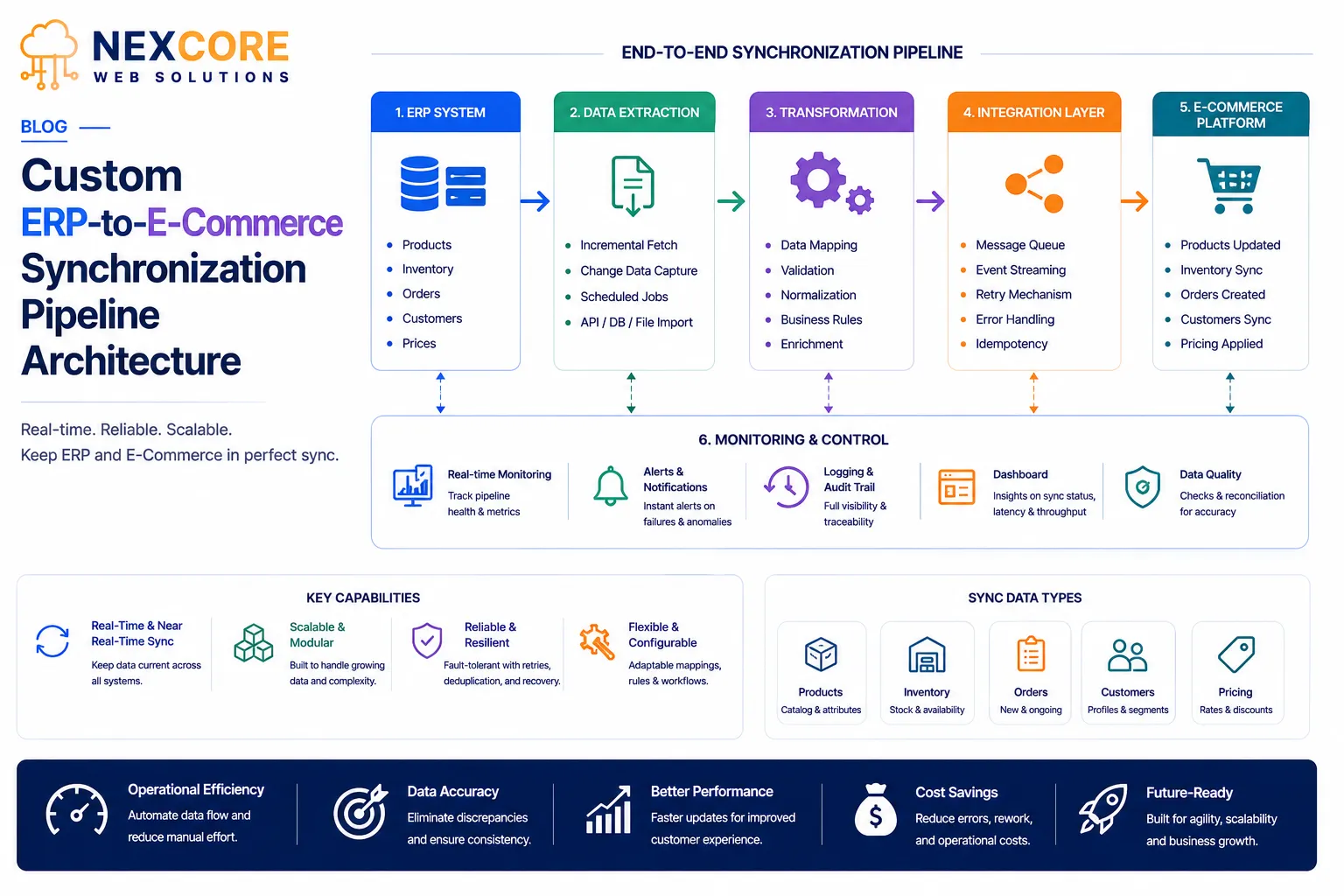
Modern e-commerce businesses often depend on an ERP system as the central source of operational information while using a separate platform to manage online sales. Product catalogs, prices, inventory, customer accounts, orders, taxes, and fulfillment details must move accurately between these environments. Manual imports and basic point-to-point integrations can work at small scale, but they become unreliable as transaction volumes and product complexity increase. A custom ERP-to-e-commerce synchronization pipeline creates a structured connection between business systems, allowing information to move automatically while applying validation, transformation, security, and error-handling rules. The architecture must do more than transfer records because enterprise commerce requires accurate, timely, and traceable data. A well-designed pipeline helps prevent overselling, incorrect pricing, duplicate orders, and operational delays.
Understanding ERP-to-E-Commerce Integration
Why Synchronization Is Complex
ERP and e-commerce platforms are usually designed for different purposes. An ERP manages internal operations such as accounting, procurement, inventory, purchasing, and fulfillment, while an e-commerce platform focuses on customer-facing shopping experiences and transactions. Their data structures, identifiers, workflows, and update frequencies may therefore differ considerably. A synchronization pipeline bridges these differences without forcing either platform to change its core architecture.
Defining the Source of Truth
Before development begins, organizations should determine which system owns each category of information. For example, the ERP may control inventory and wholesale pricing while the e-commerce platform manages storefront content and customer interactions. Clearly defining ownership prevents conflicting updates and circular synchronization. Every data domain should have a documented source of truth.
Core Pipeline Architecture
Data Extraction Layer
The extraction layer retrieves changes from the ERP through APIs, database connectors, webhooks, scheduled exports, or change-data-capture mechanisms. Rather than transferring entire datasets repeatedly, production systems should prioritize incremental changes whenever possible. Incremental processing reduces network usage and shortens synchronization cycles. It also makes recovery easier when individual transactions fail.
Transformation and Validation
Raw ERP records rarely match the exact format required by an e-commerce platform. A transformation layer maps product fields, customer identifiers, pricing structures, tax information, inventory units, and order statuses into compatible formats. Validation rules should check required fields, data types, identifiers, and business constraints before records are delivered downstream. Invalid records should be isolated rather than silently accepted.
Real-Time and Scheduled Synchronization
Event-Driven Updates
Webhooks and event-driven messaging are useful when changes need to reach the storefront quickly. An inventory adjustment, price update, or order event can trigger a synchronization workflow without waiting for the next scheduled job. This approach reduces data freshness delays and improves responsiveness. It is especially valuable for high-volume catalogs and fast-moving inventory.
Batch Synchronization
Not every data type requires real-time processing. Large historical datasets, reporting information, product descriptions, or low-priority records may be synchronized through scheduled batches. Batch jobs can process large volumes efficiently while avoiding unnecessary pressure on APIs and databases. Many enterprise architectures combine real-time events with scheduled processing.
Inventory Synchronization
Preventing Overselling
Inventory accuracy is one of the most important responsibilities of an ERP-to-e-commerce pipeline. If stock levels are delayed or incorrectly mapped, customers may purchase products that are no longer available. Synchronization should account for stock changes from sales, returns, warehouse adjustments, cancellations, and manual updates. Fast propagation of inventory changes reduces the risk of overselling.
Multiple Warehouses
Businesses operating multiple warehouses require more sophisticated inventory logic. The pipeline may need to synchronize warehouse-specific quantities, fulfillment locations, reserved stock, and available-to-promise values. E-commerce platforms can then display accurate availability based on business rules. Proper warehouse mapping is essential for reliable fulfillment.
Order Synchronization
Sending Orders to the ERP
When customers complete purchases, order information must reach the ERP accurately and without duplication. The pipeline should transfer customer details, products, quantities, discounts, taxes, shipping information, payment status, and order identifiers. Idempotency mechanisms ensure that retrying a failed request does not create duplicate orders. Reliable order processing protects both revenue and operational workflows.
Returning Fulfillment Updates
Synchronization should also operate in the opposite direction. Shipment creation, tracking information, cancellations, refunds, and fulfillment statuses may originate inside the ERP or warehouse system and need to appear in the customer’s online account. Bidirectional synchronization keeps customers and internal teams working from consistent information. Clear status mapping prevents confusing order states.
Reliability and Error Handling
Retry Mechanisms
External APIs and network connections can fail temporarily, so synchronization pipelines should not assume every request succeeds. Controlled retries with exponential backoff can recover from transient failures without overwhelming external services. Persistent failures should be moved into dead-letter queues for investigation. This approach protects data integrity while keeping normal processing moving.
Monitoring and Alerts
A production pipeline requires visibility into synchronization latency, failed records, queue depth, API errors, duplicate attempts, and data mismatches. Centralized dashboards and structured logs help technical teams identify problems quickly. Alerts should prioritize business-critical failures rather than generating excessive noise. Observability turns integration from a hidden dependency into a manageable operational system.
Security and Data Governance
ERP integrations can expose sensitive business and customer information, making security a fundamental design requirement. API credentials should be stored securely, communications should use encryption, and access should follow least-privilege principles. Audit logs should record important synchronization events without exposing unnecessary sensitive data. Data retention and compliance policies should also apply to intermediate queues and storage systems.
Scalability and Future Expansion
A custom pipeline should be designed for growth rather than current transaction volumes alone. Queue-based processing, horizontal workers, rate limiting, caching, and independent processing stages allow synchronization capacity to increase as business activity grows. Modular architecture also makes it easier to add marketplaces, new storefronts, warehouses, payment systems, or additional ERP modules later. Scalability should be built into the integration foundation.
Conclusion
A custom ERP-to-e-commerce synchronization pipeline provides the infrastructure needed to keep operational and customer-facing systems aligned as digital commerce grows. Successful architecture combines clear data ownership, incremental processing, transformation and validation, real-time events, scheduled jobs, reliable order handling, inventory synchronization, security, and comprehensive monitoring. The goal is not simply to move information between two platforms but to create a dependable data flow that supports daily business operations. Organizations that invest in resilient synchronization architecture can reduce manual work, prevent costly data errors, improve inventory accuracy, and deliver more consistent customer experiences. A carefully engineered pipeline also creates a flexible foundation for future channels, integrations, and higher transaction volumes.
FAQs
1. What is an ERP-to-e-commerce synchronization pipeline?
An ERP-to-e-commerce synchronization pipeline is an automated architecture that transfers business data between an ERP system and an online commerce platform. It can synchronize products, prices, inventory, customers, orders, fulfillment statuses, and other records while applying transformation, validation, security, and error-handling rules.
2. Should ERP and e-commerce synchronization be real-time?
Not every data type requires real-time synchronization. Inventory, orders, and critical pricing information often benefit from event-driven updates, while historical records and low-priority data can use scheduled batches. A hybrid approach allows businesses to balance freshness, system load, API limits, and operational requirements.
3. How can duplicate orders be prevented?
Duplicate orders can be prevented by using idempotency keys, unique transaction identifiers, synchronization logs, and database constraints. When a request is retried after a timeout or temporary failure, the system checks whether the transaction has already been processed before creating another record. This protects revenue and operational accuracy.
4. How does ERP synchronization improve inventory accuracy?
ERP synchronization can continuously transfer stock changes caused by sales, returns, warehouse adjustments, cancellations, and reservations. Accurate mapping of warehouse and inventory states helps the storefront display more reliable availability. Faster synchronization also reduces the risk of customers purchasing products that are no longer available.
5. What should be monitored in an ERP integration pipeline?
Organizations should monitor synchronization latency, failed records, queue depth, API response errors, retry counts, duplicate attempts, inventory discrepancies, and processing throughput. Structured logs, dashboards, distributed tracing, and automated alerts provide visibility into integration health and help teams resolve business-critical problems before they affect customers.