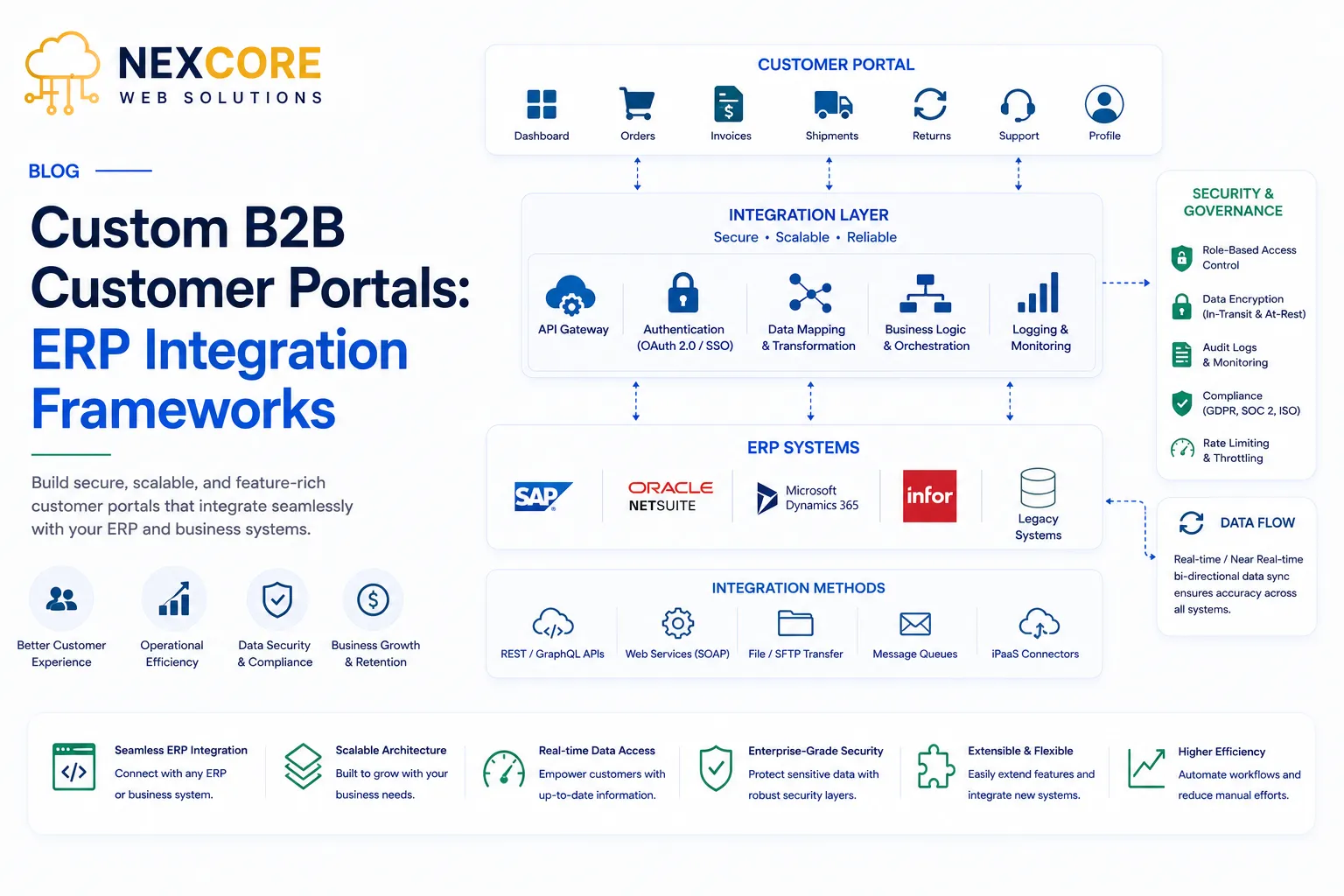
Modern B2B customers expect far more than basic online ordering or account management. They want real-time access to invoices, inventory levels, shipment tracking, pricing, support requests, and purchase history through a secure, self-service portal. Delivering these capabilities requires seamless communication between customer-facing applications and the organization’s Enterprise Resource Planning (ERP) system. A custom B2B customer portal becomes significantly more valuable when it connects directly to ERP data, eliminating manual processes and improving operational efficiency. However, successful integration involves much more than connecting two systems. Choosing the right ERP integration framework determines how securely, reliably, and efficiently business data flows between applications. Understanding these frameworks helps organizations build scalable customer portals that improve user experience while supporting long-term digital transformation initiatives.
Understanding Custom B2B Customer Portals
What Is a B2B Customer Portal?
A B2B customer portal is a secure online platform that allows business clients to manage their interactions with a supplier or service provider. Customers can place orders, review invoices, monitor shipments, access contracts, download documents, and communicate with support teams from a single interface. Unlike consumer websites, B2B portals often support multiple users, approval workflows, customized pricing, and account-specific permissions. These features improve operational efficiency while reducing manual administrative work.
Why ERP Integration Matters
ERP systems contain critical business information including inventory, customer records, pricing, financial transactions, production schedules, and order management. Without integration, portal users may see outdated or incomplete information that requires manual updates from internal staff. Connecting the portal directly to the ERP system ensures customers receive accurate, real-time information while reducing duplicate data entry and minimizing operational errors.
Common ERP Integration Frameworks
API-Based Integration
Modern ERP platforms frequently provide REST or GraphQL APIs that enable secure communication with external applications. API-based integration allows customer portals to retrieve inventory, pricing, order status, and account information whenever users request it. This real-time approach delivers accurate information while supporting responsive customer experiences. APIs also simplify future integrations with additional business systems as digital requirements evolve.
Middleware Integration
Middleware acts as an intermediary between the customer portal and the ERP platform. Instead of connecting directly, both systems exchange information through an integration platform that manages authentication, data transformation, routing, and monitoring. Middleware simplifies complex enterprise environments where multiple applications communicate simultaneously. Organizations with diverse software ecosystems often prefer this architecture because it improves flexibility and reduces direct system dependencies.
Event-Driven Integration
Event-driven frameworks automatically trigger actions whenever specific business events occur within the ERP system. For example, when an order status changes or inventory levels are updated, the portal immediately reflects the new information without requiring continuous polling. This architecture reduces unnecessary API requests while providing timely updates to customers. Event-driven integration is particularly effective for businesses requiring near real-time synchronization across multiple platforms.
Key Components of an Integration Framework
Data Synchronization
Accurate synchronization ensures customer information remains consistent across all connected systems. Product catalogs, pricing, customer accounts, invoices, and inventory levels should update automatically whenever changes occur within the ERP environment. Reliable synchronization reduces manual intervention while preventing discrepancies that could affect customer trust. Well-designed synchronization processes also improve reporting accuracy across the organization.
Authentication and Authorization
ERP systems often contain confidential financial and operational information that requires strict access control. Secure authentication verifies user identities before granting portal access, while authorization limits users to information relevant to their accounts and permissions. Implementing role-based access control strengthens security while supporting organizations with multiple users under the same customer account. Proper identity management also supports regulatory compliance requirements.
Scalability Considerations
Supporting Business Growth
As organizations acquire new customers and expand into additional markets, customer portals must continue performing efficiently. Scalable integration frameworks distribute workloads across multiple services while minimizing performance bottlenecks. Cloud-based infrastructure, load balancing, and asynchronous processing help maintain responsive user experiences during periods of increased demand. Designing for future growth prevents costly architectural redesigns later.
Handling High Transaction Volumes
Large B2B organizations process substantial numbers of orders, invoices, inventory updates, and customer requests every day. Integration frameworks should efficiently handle these workloads without overwhelming the ERP system. Queue management, caching, and batch processing reduce unnecessary resource consumption while maintaining reliable data exchange. Performance optimization becomes increasingly important as transaction volumes continue growing.
Security Best Practices
Protecting Business Data
Sensitive business information must remain protected throughout every stage of the integration process. Encryption should secure data both during transmission and while stored within connected systems. API credentials, authentication tokens, and configuration settings should be managed using secure credential management solutions rather than embedded within application code. Strong security practices help reduce exposure to cyber threats and unauthorized access.
Monitoring and Error Handling
Even well-designed integrations can experience unexpected failures due to network interruptions, software updates, or infrastructure issues. Continuous monitoring helps identify synchronization errors before they affect customers or internal operations. Automated retry mechanisms, detailed logging, and alert systems enable technical teams to resolve issues quickly while maintaining business continuity. Proactive monitoring strengthens overall platform reliability.
Choosing the Right Integration Strategy
The best ERP integration framework depends on business size, technical infrastructure, ERP capabilities, and long-term digital objectives. Organizations with modern cloud ERP platforms often benefit from API-first architectures, while complex enterprise environments may require middleware or hybrid integration strategies. Evaluating scalability, security, maintenance requirements, and future expansion plans ensures the selected framework continues supporting evolving business needs. Careful planning reduces implementation risks while maximizing long-term return on investment.
Conclusion
Custom B2B customer portals become significantly more valuable when they integrate seamlessly with enterprise ERP systems. Real-time access to inventory, orders, invoices, pricing, and customer information improves operational efficiency while delivering better digital experiences for business clients. Selecting the appropriate ERP integration framework requires balancing scalability, security, performance, and maintainability according to organizational requirements. Whether using APIs, middleware, or event-driven architectures, businesses should prioritize reliable data synchronization and strong security controls throughout the integration process. A carefully planned framework not only supports current business operations but also creates a flexible foundation for future digital transformation. As customer expectations continue evolving, organizations that invest in robust ERP integration will be better positioned to deliver efficient, secure, and scalable self-service experiences.
FAQs
1. What is a custom B2B customer portal?
A custom B2B customer portal is a secure online platform that allows business customers to access account information, place orders, view invoices, track shipments, download documents, and manage support requests. Unlike standard eCommerce websites, these portals are customized to match specific business processes, user roles, and customer requirements.
2. Why is ERP integration important for B2B customer portals?
ERP integration ensures customers receive accurate, real-time information directly from the organization’s core business systems. Inventory availability, order status, pricing, invoices, and customer records remain synchronized automatically, reducing manual work, preventing data inconsistencies, and improving the overall customer experience through timely and reliable information.
3. Which ERP integration framework is best for modern businesses?
API-based integration is often the preferred choice for modern businesses because it enables secure, real-time communication between customer portals and ERP systems. However, organizations with multiple enterprise applications may benefit from middleware or event-driven integration frameworks depending on their infrastructure, scalability requirements, and operational complexity.
4. How can businesses secure ERP integrations?
Businesses should implement encrypted communication, secure API authentication, role-based access control, protected credential management, continuous monitoring, and detailed audit logging. Regular security testing, vulnerability assessments, and software updates further strengthen ERP integrations while protecting sensitive business and customer information from unauthorized access.
5. Can ERP integration improve operational efficiency?
Yes. ERP integration automates data synchronization between internal systems and customer portals, eliminating duplicate data entry and reducing manual administrative tasks. Employees spend less time updating information, while customers receive accurate, real-time access to business data. This improves productivity, reduces operational errors, and supports faster business processes.