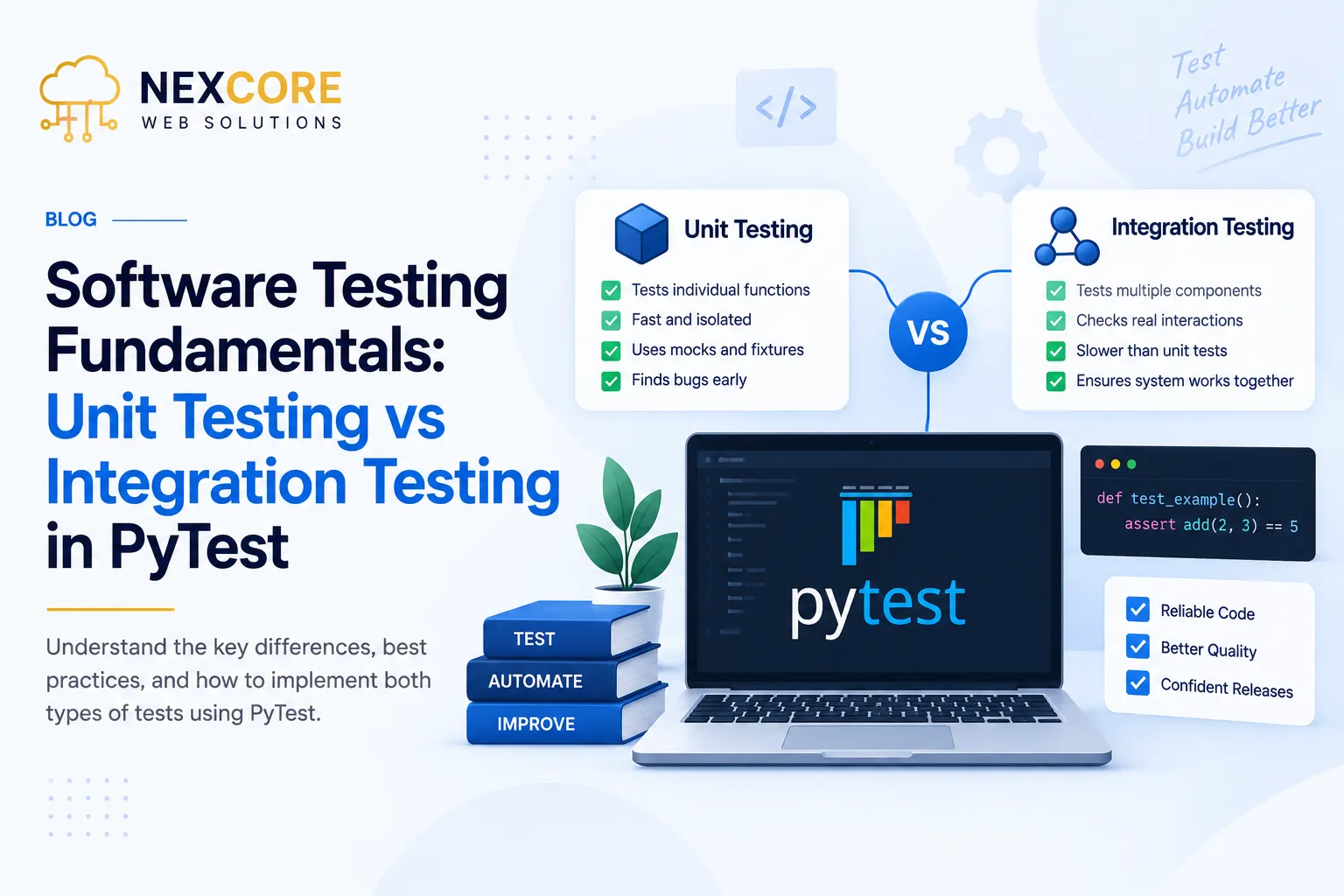
Software testing helps developers catch defects before users encounter them, but not every test serves the same purpose. In Python projects, PyTest provides a flexible and readable framework for checking whether code behaves as expected. Two essential testing approaches are unit testing and integration testing, and understanding the difference helps teams build reliable applications without wasting time. Unit tests examine small pieces of logic in isolation, while integration tests verify that multiple components work correctly together. Both are valuable, but they answer different questions about software quality. By learning how to write, organize, and maintain these tests in PyTest, developers can detect bugs earlier, improve confidence during code changes, and create applications that are easier to maintain.
Understanding Unit Testing in PyTest
What Is a Unit Test?
A unit test checks the smallest practical part of an application, usually a function, method, or class. The goal is to confirm that one component produces the correct result for a known input without depending on databases, networks, files, or other external services. For example, an online store might contain a function that calculates the final price after applying a discount. A unit test can verify the calculation quickly and repeatedly using different prices and discount values. Because the test focuses on one piece of logic, a failure usually points directly to the defective code.
PyTest makes unit testing straightforward because test files and functions require very little setup. A test function commonly begins with test_, and developers use Python’s built-in assert statement to check expected behavior. For example:
Python
Run
def calculate_total(price, discount):
    return price - (price * discount / 100)

def test_calculate_total():
    assert calculate_total(1000, 10) == 900
This test confirms that a ten-percent discount on a price of 1,000 produces a total of 900. If the function changes incorrectly, PyTest reports the failed assertion and shows useful information about the actual and expected values. Developers can also use pytest.mark.parametrize to test several input combinations without writing separate functions for every case.
Benefits of Unit Testing
Unit tests are usually fast because they avoid expensive external operations. Developers can run hundreds or thousands of them whenever they save code or open a pull request. They also encourage better design because tightly coupled or overly complicated functions are often difficult to test independently. When a unit test fails, the problem is generally easier to locate than a failure in a large end-to-end workflow. However, unit tests cannot prove that separate components communicate correctly, which is why integration testing remains necessary.
Understanding Integration Testing in PyTest
What Is an Integration Test?
Integration testing checks whether two or more components work together as intended. Instead of testing a function in isolation, an integration test may verify the connection between an application service and a database, an API endpoint and its authentication layer, or a payment module and an order-processing system. These tests focus on communication, data formats, configuration, and real interactions. A function may pass every unit test but still fail when it sends an incorrect query to a database or receives an unexpected response from another service.
Consider a registration feature in a web application. A unit test might confirm that a password validation function rejects weak passwords. An integration test would go further by submitting registration data, validating the request, storing the user in a test database, and checking whether the correct response is returned. This process verifies that several layers operate together. Integration tests usually take longer than unit tests because they may require database connections, application setup, test data, or temporary services.
Writing Integration Tests with PyTest
PyTest supports integration testing through fixtures, application test clients, and plugins. A fixture can prepare a database, create test records, or provide a configured application instance before a test runs. Afterward, the fixture can remove temporary data so that later tests start with a clean environment. For example, a Flask or FastAPI project may use a test client to send HTTP requests without launching a public production server. The test can then check the status code, response body, and database changes.
Integration tests should use safe test environments rather than live production systems. Developers may use an isolated database, temporary files, mocked external payment providers, or containerized services. The purpose is to reproduce realistic interactions while avoiding accidental charges, data loss, or dependency on unstable third-party systems. Good integration tests also verify failure conditions, such as invalid credentials, unavailable services, duplicate records, and malformed responses.
Unit Testing vs Integration Testing: Key Differences
The main difference is scope. Unit testing examines one component and normally replaces external dependencies with mocks or simple test doubles. Integration testing examines multiple components and often uses real internal dependencies to confirm that communication works correctly. Unit tests are faster, more focused, and easier to diagnose, while integration tests provide stronger confidence about real application behavior.
The two approaches also differ in maintenance and execution cost. Unit tests can run on every small code change, whereas integration tests may run during continuous integration pipelines or before a release because they require more setup. A healthy project does not choose one approach exclusively. Instead, developers should maintain many focused unit tests and a smaller number of carefully selected integration tests covering the most important workflows.
Best Practices for PyTest Projects
Organize Tests Clearly
A consistent test structure makes a project easier to understand. Many teams place tests in a dedicated tests directory and use names such as test_pricing.py for unit tests and test_user_registration.py for integration tests. Clear names should describe the behavior being checked rather than the internal implementation. Developers should also keep test data readable and avoid making one test depend on another test’s execution order.
Use Fixtures and Mocking Carefully
Fixtures reduce repeated setup and make test dependencies explicit. Use them for reusable objects such as test clients, database sessions, or sample users. Mocking is useful in unit tests when external services would make tests slow or unpredictable, but excessive mocking can hide real integration problems. A practical balance is to mock external systems in unit tests and use realistic test environments in integration tests.
Test Edge Cases and Failures
Reliable tests should cover more than successful inputs. Include empty values, incorrect types, boundary numbers, duplicate records, missing permissions, and unexpected service responses. Testing failure behavior is especially important because users often experience errors rather than ideal workflows. Each test should check one meaningful behavior and provide a clear failure message when possible.
Conclusion
Unit testing and integration testing serve different purposes, but together they create a stronger software quality process. Unit tests in PyTest confirm that individual functions and classes behave correctly, while integration tests verify that connected components exchange data and complete real workflows successfully. Developers should begin with focused unit tests because they are fast and easy to run frequently, then add integration tests around databases, APIs, authentication, and other important boundaries. Fixtures, safe test environments, meaningful test names, and realistic edge cases make both approaches more effective. The best testing strategy is not about writing the largest number of tests; it is about creating the right coverage to detect defects early and protect users from failures.
FAQs
What is unit testing in PyTest?
Unit testing in PyTest checks individual functions, methods, or classes in isolation. Developers provide controlled inputs and use assertions to confirm the expected output or behavior. External dependencies such as databases and APIs are commonly mocked or replaced with simple test doubles. Unit tests are fast, easy to repeat, and useful for identifying defects in specific pieces of application logic before they affect larger workflows.
What is integration testing in PyTest?
Integration testing in PyTest verifies that multiple application components work together correctly. A test may send a request through an API, validate the business logic, store information in a database, and inspect the final response. These tests use more realistic dependencies than unit tests and often require fixtures for setup and cleanup. They help detect communication, configuration, and data-handling problems.
Should every function have a unit test?
Not every function needs an individual test, but important business logic and risk-prone behavior should receive strong coverage. Simple code may be adequately tested through a larger unit or integration test, while complex calculations deserve focused tests. Developers should prioritize authentication, payments, permissions, data processing, and edge cases. The goal is meaningful coverage rather than an arbitrary number of tests.
Can PyTest run unit and integration tests together?
Yes, PyTest can run both types of tests in the same project. Teams can organize them into separate folders or use markers such as @pytest.mark.integration to identify slower integration tests. Commands can then run the complete suite or only a selected category. Separating tests helps developers receive quick feedback during development while still running broader checks in continuous integration.
How can developers make PyTest tests more reliable?
Reliable PyTest tests use isolated data, clear assertions, predictable environments, and independent execution. Avoid depending on test order, shared mutable state, live third-party services, or production databases. Use fixtures for repeatable setup and cleanup, and mock unstable external systems when appropriate. Developers should also test both successful and failure scenarios, review flaky tests quickly, and run the suite regularly in automated pipelines.