Training a machine learning model is only one part of building a useful ML application. A model becomes valuable when other applications, users, or services can send data to it and receive predictions reliably. This requires a deployment architecture that connects the trained model with an API, runtime environment, dependencies, and production infrastructure. Flask provides a lightweight way to expose a Python model through HTTP endpoints, while Docker packages the application and its dependencies into a consistent container. Together, these technologies create a practical deployment path for student projects, prototypes, internal tools, and smaller production services. Understanding this architecture also helps developers identify problems involving model loading, request validation, dependency management, logging, scalability, and environment consistency before deploying an application to a server.
Understanding the ML Deployment Pipeline
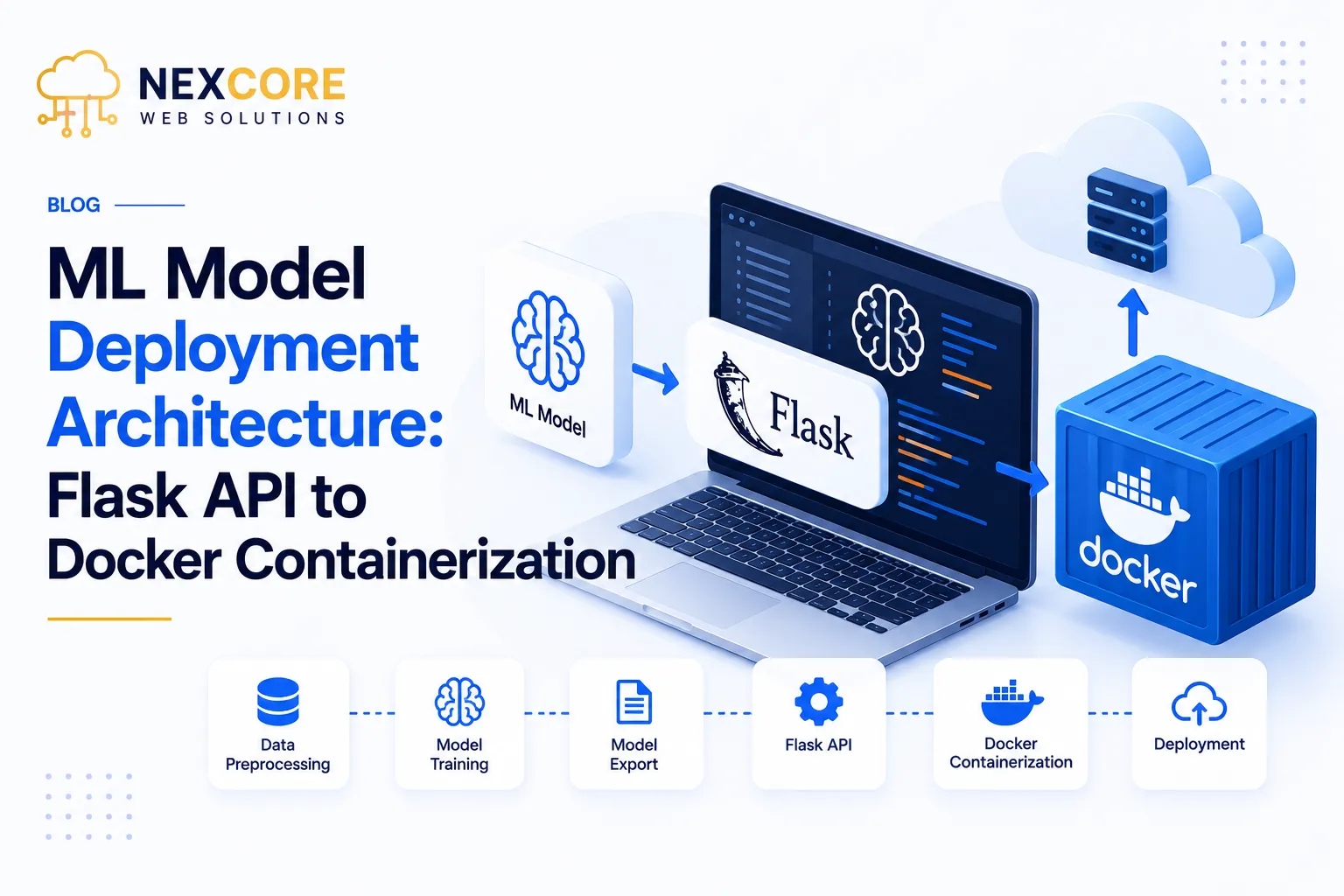
A typical machine learning deployment pipeline begins with a trained model saved as a file. Depending on the framework, this could be a serialized scikit-learn model, a PyTorch checkpoint, a TensorFlow model, or another supported format. The deployment application loads this model and exposes an endpoint that accepts input data and returns predictions. A client can then communicate with the model through a standard HTTP request instead of directly interacting with Python code.
The architecture can be viewed as several connected layers: client, Flask API, preprocessing logic, trained model, prediction response, and container runtime. Keeping these responsibilities separated makes the application easier to test and maintain. For example, preprocessing should use the same assumptions applied during training, otherwise the model may receive data in an unexpected format. A deployment design should therefore treat the model, preprocessing pipeline, API, and runtime environment as parts of one system.
Creating a Flask Prediction API
Flask is commonly used to build simple Python web APIs because its routing and request-handling model is straightforward. A basic prediction endpoint can receive JSON data, validate required fields, transform the input into the format expected by the model, and return a JSON response. The model should generally be loaded when the application starts rather than repeatedly loaded for every request. This avoids unnecessary disk operations and reduces prediction latency.
Example API Structure
A simple Flask application might expose a /predict endpoint that receives features from a client. The server parses the request, creates an appropriate input structure, and calls the model’s prediction method. The result can then be converted into JSON and returned with a suitable HTTP status code. Production implementations should additionally validate missing fields, incorrect data types, unexpected values, and malformed requests.
The API should also separate prediction logic from HTTP handling. A dedicated prediction function can receive prepared data and return a model result, while the Flask route manages requests and responses. This separation makes unit testing easier and allows the model-serving logic to evolve without rewriting the entire API layer. Clear error responses are equally important because clients need to distinguish invalid input from internal prediction failures.
Managing the Model and Preprocessing
One common deployment mistake is saving only the trained estimator while forgetting the preprocessing steps used during training. If numerical values were scaled, categorical variables encoded, or columns arranged in a particular order, the production application must reproduce those transformations correctly. A pipeline object that combines preprocessing and the model can reduce the risk of inconsistent transformations. The deployment environment should also use compatible library versions.
Model loading deserves careful attention when the model file is large. Loading the model once during application startup can reduce repeated overhead, but memory usage must be considered when multiple application workers are running. Developers should also keep model files separate from temporary request data and protect them from accidental modification. Versioning model artifacts makes it easier to identify which model produced a particular prediction.
Dockerizing the Flask Application
Docker packages an application with its runtime dependencies into a container image. A typical ML container includes Python, application code, dependency definitions, the model artifact, and any system packages required by the libraries. This creates a more predictable environment across development, testing, and deployment systems.
Dockerfile Basics
A Dockerfile commonly starts from a Python base image, sets an application working directory, copies dependency files, installs packages, and then copies the application source. The container exposes the port used by the API and defines a command that starts the application server. A minimal structure might include requirements.txt, app.py, the trained model, and a Dockerfile.
Using a dependency file with pinned or carefully controlled versions can reduce compatibility problems. Developers should avoid copying unnecessary files into the image and should use a .dockerignore file to exclude items such as local virtual environments, caches, development artifacts, and secrets. Smaller images are generally easier to transfer, scan, and maintain.
Running and Testing the Container
After building the Docker image, developers can start a container and map its internal API port to a host port. The application can then be tested using a browser, curl, Postman, or another HTTP client. Testing should include valid requests, missing fields, incorrect data types, empty payloads, and unexpected values. These tests help identify problems before the container reaches a shared or production environment.
Container logs are also important during troubleshooting. Flask errors, model-loading failures, dependency issues, and invalid requests should produce useful diagnostic information without exposing sensitive data. Health endpoints can provide a simple way for deployment infrastructure to determine whether the service is running. Monitoring resource usage is especially important for ML applications because models can consume significant memory or CPU.
Production Deployment Considerations
The Flask development server is designed for development rather than serious production workloads. A production deployment typically places a suitable WSGI server between the application and incoming traffic, with infrastructure handling process management and networking. Depending on traffic requirements, multiple container instances may be deployed behind a load balancer. Authentication, HTTPS, rate limiting, request validation, and observability should also be considered.
Scaling an ML API is not simply a matter of increasing the number of containers. Each worker may load its own copy of the model, increasing memory consumption. CPU-heavy or GPU-dependent models may require different deployment strategies, while larger systems may separate preprocessing, inference, and asynchronous workloads. Capacity testing should therefore measure actual latency, throughput, memory consumption, and model-loading behavior.
Security and Reliability
An ML prediction API should never assume that incoming data is trustworthy. Validate request payloads, restrict accepted fields, configure appropriate request limits, and avoid exposing internal error details to clients. Secrets such as API keys should be supplied through environment or secret-management systems rather than hard-coded into the Docker image. Dependency updates and image scanning should also be part of the maintenance process.
Reliability improves when the service has predictable startup behavior and clear failure handling. If the model cannot load, the application should fail visibly rather than silently returning incorrect predictions. Logging model versions, request identifiers, latency, and error rates can help diagnose production issues. These practices make an ML deployment easier to operate as usage grows.
Conclusion
A practical ML deployment architecture connects a trained model to users through an API and packages the complete runtime environment for consistent execution. Flask provides a straightforward layer for receiving prediction requests, validating inputs, running inference, and returning structured responses. Docker then packages the application, dependencies, and supporting files into a reproducible container. A reliable deployment also requires correct preprocessing, model versioning, production-grade serving, logging, security, and resource monitoring. Developers should test the complete pipeline rather than focusing only on whether the model produces predictions locally. By treating model inference as a complete software service, teams can move from a working notebook to a maintainable and deployable machine learning application.
FAQs
1. Why use Flask for machine learning model deployment?
Flask provides a lightweight way to expose Python-based machine learning models through HTTP endpoints. Developers can create routes that receive JSON input, validate data, run predictions, and return structured responses. It is particularly useful for prototypes, educational projects, internal services, and relatively simple inference APIs. Larger systems may require additional production infrastructure depending on traffic, model size, latency, and scalability requirements.
2. Why should an ML model be loaded when the Flask application starts?
Loading the model during application startup avoids repeatedly reading and deserializing the model file for every prediction request. This can significantly reduce unnecessary overhead and improve response consistency. However, each application worker may maintain its own model instance, which can increase memory usage. Developers should therefore consider worker count, model size, available resources, and expected traffic when configuring the service.
3. What does Docker provide for ML deployment?
Docker packages the application, Python runtime, dependencies, system libraries, and required files into a container image. This helps reduce differences between development, testing, and deployment environments. Docker also makes it easier to reproduce an application on different machines or infrastructure. For ML projects, this can be particularly useful because scientific libraries often have specific version and system requirements.
4. Can a Flask ML API handle production traffic?
A Flask application can be part of a production ML service, but the development server should not normally be used as the production serving layer. Production deployments commonly use a suitable WSGI server and may place containers behind a load balancer. The required architecture depends on request volume, model complexity, memory requirements, latency targets, and whether CPU or GPU resources are needed for inference.
5. How can an ML Docker deployment be made more reliable?
Reliability improves when dependencies are controlled, model artifacts are versioned, requests are validated, and application failures are logged clearly. Developers should test both normal and invalid requests and monitor latency, memory, CPU usage, and error rates. Health checks can help infrastructure detect unavailable containers. Secrets should also remain outside the image, while regular dependency and container security updates reduce avoidable deployment risks.