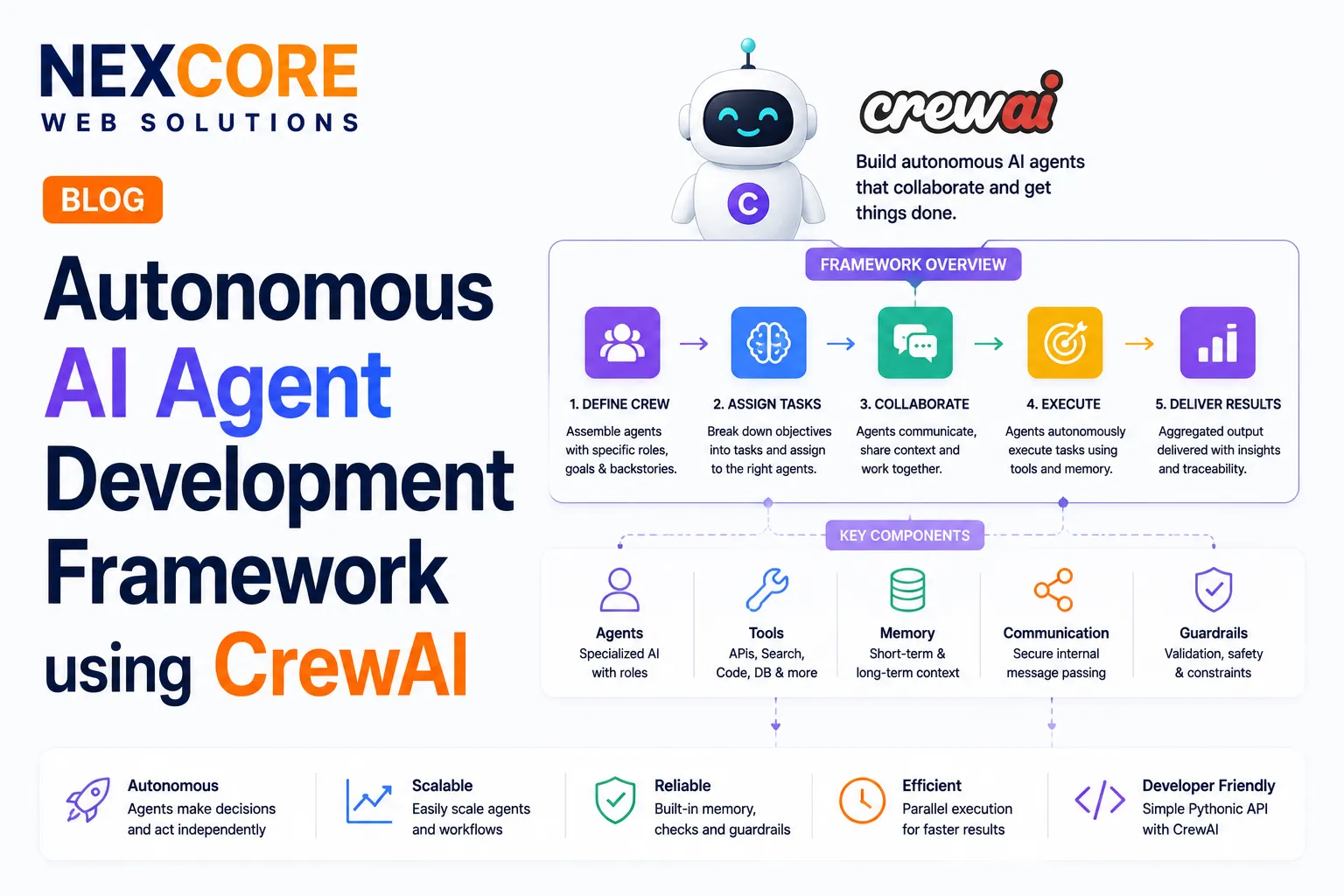
Autonomous AI agents are changing how developers design applications that handle multi-step tasks, tool usage, research, decision support, and workflow automation. Instead of sending one prompt to a language model and receiving one response, an agentic system can divide work into tasks, use external tools, pass information between specialized agents, and continue until a defined objective is reached. CrewAI is a Python-based framework designed for building these multi-agent workflows around roles, tasks, crews, and structured processes. It provides developers with abstractions for coordinating specialized AI agents without manually implementing every orchestration mechanism. However, useful autonomy requires more than connecting several models together. Developers must carefully design responsibilities, tools, permissions, validation rules, and failure handling to create systems that remain predictable, secure, and maintainable.
What Is CrewAI?
CrewAI is a framework for developing applications in which AI agents collaborate to complete defined tasks. Each agent can be assigned a role, goal, instructions, tools, and contextual information relevant to its responsibility. Tasks describe the work that needs to be completed, while orchestration determines how that work moves between agents. This structure makes it possible to model workflows that resemble teams of specialized workers rather than relying on one general-purpose prompt.
Agents, Tasks, and Crews
An agent represents a specialized participant in the workflow, such as a researcher, analyst, reviewer, or writer. A task defines a specific objective and expected result for an agent to complete. A crew combines agents and tasks into a coordinated workflow where outputs can contribute to later steps. Keeping these responsibilities explicit makes agent behavior easier to understand, test, and modify.
Designing an Autonomous Agent Architecture
A reliable agent system begins with workflow design rather than code. Developers should identify the final objective, determine which steps require reasoning or external information, and decide where deterministic application logic should remain in control. Not every operation needs a separate agent, and creating too many roles can increase latency, cost, and coordination complexity. Each agent should have a clear purpose that contributes directly to the final outcome.
Example Research Workflow
Consider an application that produces an internal technology research brief. One agent could gather relevant information, another could analyze the findings, and a final agent could organize the validated material into a structured report. The workflow becomes easier to maintain because research and analysis have separate responsibilities. Developers can also evaluate each stage independently instead of debugging one enormous prompt.
fromcrewaiimportAgent, Taskresearcher=Agent(role="Technology Researcher",goal="Collect relevant technical information",backstory="Specialist in software technology research")research_task=Task(description="Research the assigned technology topic.",expected_output="A concise research summary.",agent=researcher)
Real implementations require model configuration and potentially tools, guardrails, or additional workflow settings. The important architectural idea is that the role and task remain clearly defined. Developers should consult the framework version they are using because APIs and recommended patterns can evolve.
Tool Integration for AI Agents
Agents become more useful when they can interact with controlled external capabilities. Tools may provide database searches, internal APIs, document retrieval, calculations, file processing, or other application functions. An agent can decide when a permitted tool is relevant, while the underlying application performs the actual operation. Tool definitions should remain narrow so the model receives only the capabilities required for its assigned task.
Apply Least Privilege
An autonomous agent should never receive unrestricted access simply because its workflow requires automation. A research agent may need read-only document retrieval but should not automatically receive permission to modify records. Similarly, an order-support agent might retrieve order information without having permission to issue refunds. Authentication, authorization, parameter validation, and business rules should remain enforced by deterministic application code.
Sequential and Collaborative Workflows
Some agent workflows are naturally sequential. A research step may need to finish before an analysis step begins, and analysis may need to finish before a final report is created. This approach is easier to reason about because dependencies are explicit. Other workflows may involve more dynamic coordination, but additional autonomy should be introduced only when it produces a clear functional benefit.
Passing Context Between Tasks
Task outputs often become context for later stages. Developers should control how much information is passed because large histories can increase token usage and introduce irrelevant details. Structured intermediate outputs can make handoffs more predictable than unrestricted conversational text. For example, a research task could return findings in a predefined structure containing claims, evidence, uncertainties, and source references.
Memory and Knowledge
Agent applications may need information beyond the immediate prompt. Depending on the architecture, this can include conversation context, workflow state, retrieved documents, or previously produced task outputs. Persistent information should be stored intentionally rather than assuming the language model will reliably remember everything. Retrieval systems and application databases are often better choices for durable knowledge that needs to remain accurate and updateable.
Guardrails and Validation
Autonomous does not mean uncontrolled. Agent outputs should be validated before they trigger important actions or become trusted inputs for downstream systems. Developers can check schemas, required fields, numerical ranges, source requirements, and business constraints. High-impact actions may also require human approval, particularly when they involve payments, account permissions, publishing, or irreversible data changes.
Handling Agent Failures
Agent workflows can fail because of unavailable tools, malformed outputs, model errors, rate limits, missing information, or unexpected external responses. Production systems need defined timeout, retry, fallback, and escalation strategies. Retries should be limited because repeatedly sending the same failing request can increase costs without resolving the underlying problem. Logging each important task transition makes failures easier to reproduce and investigate.
Observability and Evaluation
Traditional application monitoring remains important for agentic systems, but developers also need visibility into agent decisions and workflow quality. Useful measurements include task duration, model usage, tool calls, error rates, retry counts, token consumption, and successful completion rates. Evaluation datasets containing representative tasks can help detect regressions when prompts, tools, models, or framework versions change. Quality should be measured against defined outcomes rather than judging individual responses informally.
Cost and Performance Optimization
Multi-agent architectures can generate more model calls than simple LLM applications. Every additional agent, retry, tool interaction, and context transfer may increase latency and operating cost. Developers should therefore avoid using autonomous reasoning for deterministic operations that conventional code can handle more efficiently. Smaller models may also be appropriate for classification or formatting tasks, while more capable models can be reserved for difficult reasoning steps.
Security Considerations
Agent systems must treat external content as potentially untrusted. Retrieved documents, web content, user messages, and tool responses can contain instructions that conflict with the application’s intended behavior. Developers should isolate permissions, validate tool arguments, restrict sensitive actions, and prevent external text from silently overriding system-level rules. Audit logs are particularly valuable when agents can access business systems or sensitive organizational information.
Conclusion
CrewAI provides a practical framework for organizing autonomous AI applications around specialized agents, tasks, tools, and coordinated workflows. Its abstractions can simplify multi-step automation, but the quality of the resulting system still depends on careful engineering decisions. Developers should begin with a clearly defined workflow, assign narrow responsibilities, restrict tool permissions, validate intermediate results, and plan for failures. Monitoring cost, latency, tool usage, and output quality is equally important once the application reaches production. The strongest agent architectures do not maximize autonomy for its own sake. Instead, they combine language-model reasoning with deterministic software controls, structured data, secure tools, and human approval where appropriate, creating workflows that are useful without sacrificing reliability.
FAQs
1. What is CrewAI used for?
CrewAI is used to build AI applications where specialized agents perform tasks within coordinated workflows. Developers can define roles, goals, tasks, tools, and processes for different agents. Typical use cases include research, document processing, analysis, content workflows, and internal automation. It is most useful when a problem benefits from separating complex work into distinct responsibilities rather than relying on one large prompt.
2. Is CrewAI only for multi-agent applications?
CrewAI is strongly associated with multi-agent orchestration, where different agents handle specialized responsibilities within a workflow. However, developers should not create multiple agents unless the application genuinely benefits from that separation. A simple task may be handled more efficiently with one model call and ordinary application code. Multi-agent architecture becomes valuable when responsibilities, tools, or workflow stages need meaningful separation.
3. Can CrewAI agents use external tools?
Yes, agents can be designed to work with tools that provide controlled access to external capabilities and information. Examples can include search systems, databases, APIs, document retrieval, and custom application functions. Tool access should follow least-privilege principles, especially in enterprise environments. The application should independently validate arguments and enforce authentication, authorization, and business rules before performing sensitive operations.
4. Are autonomous AI agents safe for production?
They can be used in production when the architecture includes appropriate controls, but autonomy should not replace security or validation. Developers should restrict permissions, validate outputs, handle failures, monitor tool usage, and maintain auditability. Sensitive or irreversible actions may require additional confirmation or human approval. Production readiness depends on the entire system design rather than the capability of the underlying language model alone.
5. How should CrewAI workflows be tested?
CrewAI workflows should be tested using representative tasks with clearly defined success criteria. Developers should evaluate individual agents, tool interactions, intermediate outputs, and complete workflows rather than testing only the final response. Useful metrics include completion quality, latency, errors, retries, token usage, and cost. Regression tests are also important when changing prompts, models, tools, framework versions, or workflow configurations.