An operating system manages the hardware and software resources that allow a computer to work efficiently. Among its most important responsibilities are controlling processes, coordinating threads, and preventing situations where programs become permanently stuck. These concepts form the foundation of multitasking, application performance, server reliability, and modern computing. Whenever you open a browser, stream a video, run a code editor, or download a file, the operating system coordinates several activities behind the scenes. Understanding process management, threads, and deadlocks helps students and developers understand how computers share resources and execute tasks. It also makes complex programming problems easier to analyze, especially when applications perform multiple operations at the same time.
Understanding Process Management
A process is a program that is currently running, along with its instructions, memory, registers, open files, and other resources. For example, opening a music player creates a process that uses memory and processor time to play audio. The operating system creates and manages processes so that several applications can run without interfering with one another. Each process usually has its own address space, which improves security and prevents one program from directly damaging another program’s memory. Process management ensures that tasks receive the resources they need while maintaining system stability.
Process States
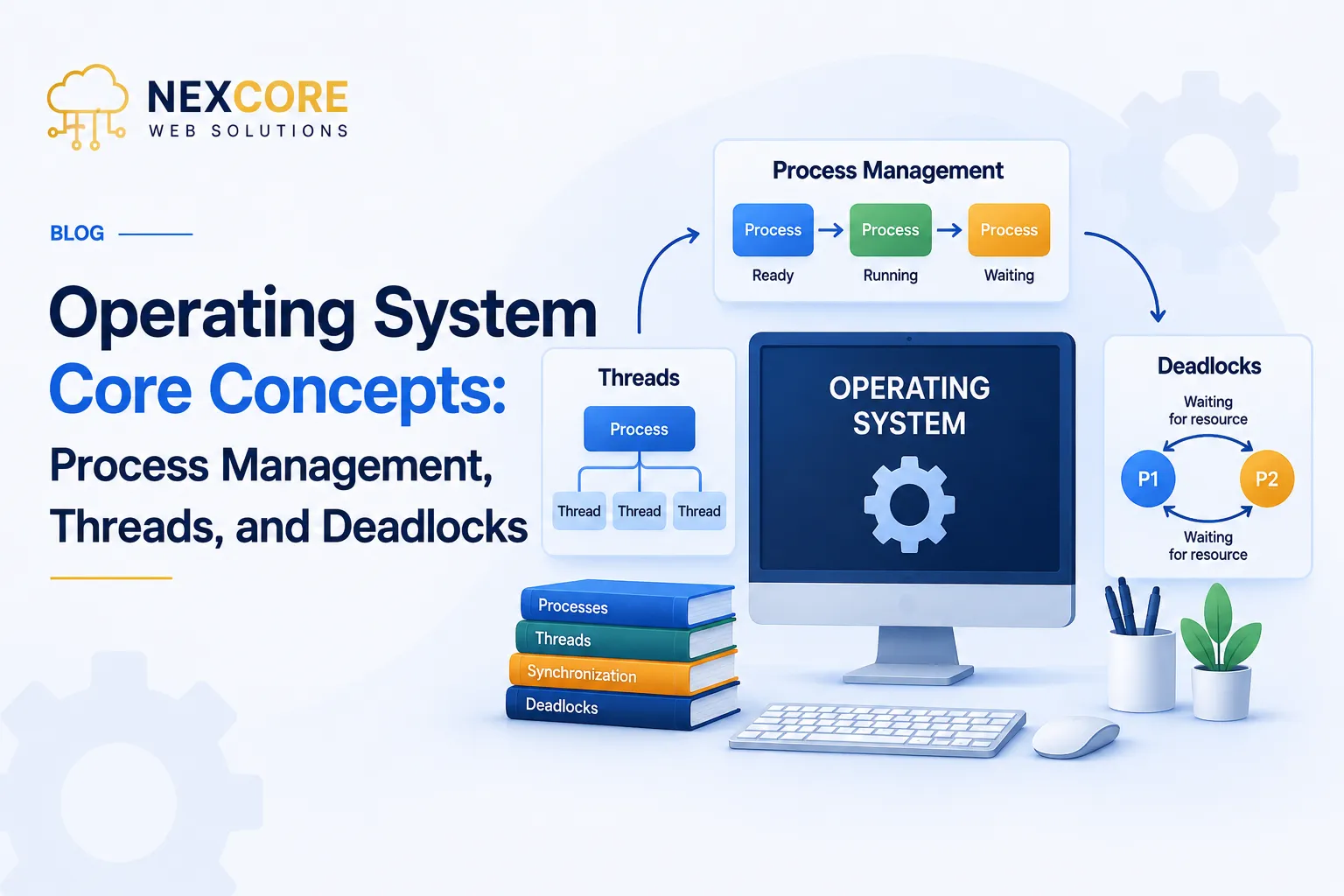
A process moves through different states during its lifetime. The common states are new, ready, running, waiting, and terminated. A new process is being created, while a ready process is waiting for CPU time. The running state means the processor is executing its instructions, whereas a waiting process is paused until an event such as file input or network data becomes available. After completing its work, the process enters the terminated state, and the operating system releases its resources.
CPU Scheduling
Because a processor can execute only a limited number of instructions at once, the operating system uses CPU scheduling to decide which ready process should run next. Scheduling algorithms include First-Come, First-Served, Shortest Job First, Round Robin, and Priority Scheduling. Round Robin is widely associated with time-sharing systems because each process receives a small time slice before the scheduler switches to another task. A good scheduling strategy improves responsiveness, fairness, and processor utilization. However, scheduling always involves trade-offs between speed, fairness, waiting time, and overhead.
Threads and Multithreading
A thread is the smallest unit of CPU execution within a process. A process may contain one thread or multiple threads that share the same code, data, and operating-system resources. For example, a web browser may use separate threads for displaying a page, processing user input, downloading resources, and running background tasks. Since threads within the same process share memory, communication between them is faster than communication between separate processes. However, shared memory also creates risks when multiple threads modify the same data simultaneously.
Benefits of Threads
Multithreading improves application responsiveness and allows programs to perform several activities concurrently. A word processor can save a document in the background while the user continues typing, preventing the interface from freezing. Threads can also improve performance on multi-core processors by allowing different tasks to execute in parallel. They are useful in web servers, games, database systems, and scientific applications that handle many independent operations. Despite these advantages, excessive threads can increase memory usage, context-switching overhead, and synchronization problems.
Thread Synchronization
When threads share resources, they must coordinate access carefully. Consider two threads updating the same bank account balance at nearly the same time. If both read the old balance before either writes the new value, one update may overwrite the other, producing an incorrect result called a race condition. Synchronization tools such as mutexes, locks, semaphores, and monitors help control access to shared data. Developers should keep critical sections short and release locks reliably to reduce delays and avoid unexpected behavior.
Deadlocks in Operating Systems
A deadlock occurs when two or more processes or threads wait indefinitely for resources held by one another. Imagine Process A holds a printer and waits for a scanner, while Process B holds the scanner and waits for the printer. Neither process can continue because each is waiting for a resource controlled by the other. Deadlocks are especially dangerous in operating systems, databases, and multithreaded applications because they can stop important tasks from completing. Detecting and preventing deadlocks is therefore a major part of resource management.
Four Necessary Conditions
A deadlock can occur only when four conditions exist together. The first is mutual exclusion, meaning a resource can be used by only one process at a time. The second is hold and wait, where a process holds one resource while waiting for another. The third is no preemption, which means the operating system cannot forcibly take a resource away under the current rules. The fourth is circular wait, where each process in a chain waits for a resource held by the next process. Breaking any one of these conditions can prevent deadlock.
Deadlock Handling Methods
Operating systems use several strategies to manage deadlocks. Deadlock prevention deliberately breaks one of the necessary conditions, such as requiring processes to request all resources before execution. Deadlock avoidance examines resource requests and grants them only when the system remains in a safe state; the Banker’s Algorithm is a classic example. Detection allows deadlocks to occur but checks for them periodically, after which the system may terminate processes or reclaim resources. In practical software, developers often prevent deadlocks by using consistent lock ordering, avoiding unnecessary locks, and applying timeouts.
Practical Best Practices
Reliable concurrent software requires careful planning rather than simply creating more processes or threads. Developers should choose processes when isolation and security matter, and threads when lightweight shared execution is more useful. Shared data should be protected with suitable synchronization tools, while long-running operations should not block user interfaces. Logging and monitoring can help identify high CPU usage, excessive waiting, and lock contention before they become serious failures. Testing under heavy workloads is also important because concurrency bugs may appear only under specific timing conditions.
Conclusion
Process management, threads, and deadlocks explain how operating systems execute multiple tasks while sharing limited resources. Processes provide isolation and resource ownership, while threads enable efficient concurrent execution inside a process. Scheduling determines which task receives CPU time, and synchronization keeps shared data consistent. Deadlocks demonstrate what can happen when resource requests are poorly coordinated, making prevention and detection essential in reliable software. Students and developers should understand process states, scheduling methods, thread communication, and the four deadlock conditions before building complex applications. With these fundamentals, it becomes easier to design responsive programs, troubleshoot performance problems, and write software that remains stable under demanding workloads.
FAQs
What is the difference between a process and a thread?
A process is an independent running program with its own memory space and system resources. A thread is a smaller execution unit inside a process and shares memory with other threads in that process. Processes provide stronger isolation, while threads are generally faster to create and switch between. Threads are useful for concurrent tasks, but shared memory requires synchronization to prevent race conditions and data corruption.
Why is CPU scheduling important in an operating system?
CPU scheduling decides which ready process or thread should use the processor next. Since many tasks compete for limited CPU time, scheduling helps improve responsiveness, fairness, and overall performance. Different algorithms prioritize different goals, such as short waiting time or equal access. A suitable scheduling method ensures that background tasks continue working without making interactive applications feel slow.
What is a race condition in multithreading?
A race condition happens when multiple threads access shared data and the final result depends on the timing of their operations. For example, two threads may read and update the same counter simultaneously, causing one update to be lost. Race conditions can produce inconsistent and difficult-to-reproduce errors. Locks, atomic operations, and other synchronization mechanisms help ensure that shared data is updated safely.
How can developers prevent deadlocks?
Developers can reduce deadlocks by acquiring multiple locks in a consistent global order and avoiding unnecessary resource ownership. Locks should be held for the shortest practical time, and applications can use timeouts when waiting for resources. Another useful technique is to avoid calling unknown or blocking code while holding a lock. Careful design, code reviews, stress testing, and deadlock detection tools also improve reliability.
Can a deadlock be recovered after it occurs?
Yes, recovery is possible, but the method depends on the operating system and application design. The system may terminate one or more involved processes, forcibly release resources, or roll back an operation to an earlier safe state. Databases often use transaction rollback, while applications may restart blocked tasks. Recovery can cause lost work or inconsistent results, so preventing deadlocks is usually safer and more efficient than repairing them later.