
Modern web applications depend on several layers working together behind every click, form submission, and page load. When a user opens a website or requests information, the browser communicates with a server through HTTP, while backend services may interact with databases, APIs, and other systems. Understanding this communication helps developers build applications that are easier to maintain, troubleshoot, secure, and optimize. Full-stack architecture connects the frontend, backend, database, network, and supporting infrastructure into one complete workflow. The HTTP request lifecycle explains what happens from the moment a client makes a request until it receives and processes the server’s response. For students and developers, understanding this process creates a strong foundation for practical web development.
Understanding Full-Stack Web Architecture
A typical full-stack application contains three major layers: the client, the server, and the data layer. The client is usually a browser or mobile application responsible for displaying information and collecting user actions. The server handles business logic, authentication, validation, API requests, and communication with databases or external services. The database stores persistent information such as users, products, orders, or articles. These layers can run on separate systems but communicate through defined interfaces and network protocols.
Client-Side Responsibilities
The frontend controls what users see and how they interact with an application. HTML provides structure, CSS manages presentation, and JavaScript adds dynamic behavior such as form validation, filtering, animations, and API communication. For example, when a user submits a login form, JavaScript can send the entered information to an authentication endpoint without requiring a complete page reload. The browser then receives the response and updates the interface according to the result. Keeping presentation and interaction logic separate from backend business rules makes applications easier to manage.
Server-Side Responsibilities
The backend acts as the application’s processing layer. It receives requests, validates incoming data, checks authentication and authorization, applies business rules, and communicates with databases or external services. An online shopping request might require the server to verify the customer, check product availability, calculate the total, save an order, and return confirmation. Backend frameworks provide features for routing, middleware, sessions, validation, and database access. Organizing these responsibilities clearly becomes increasingly important as an application grows.
Client-Server Communication
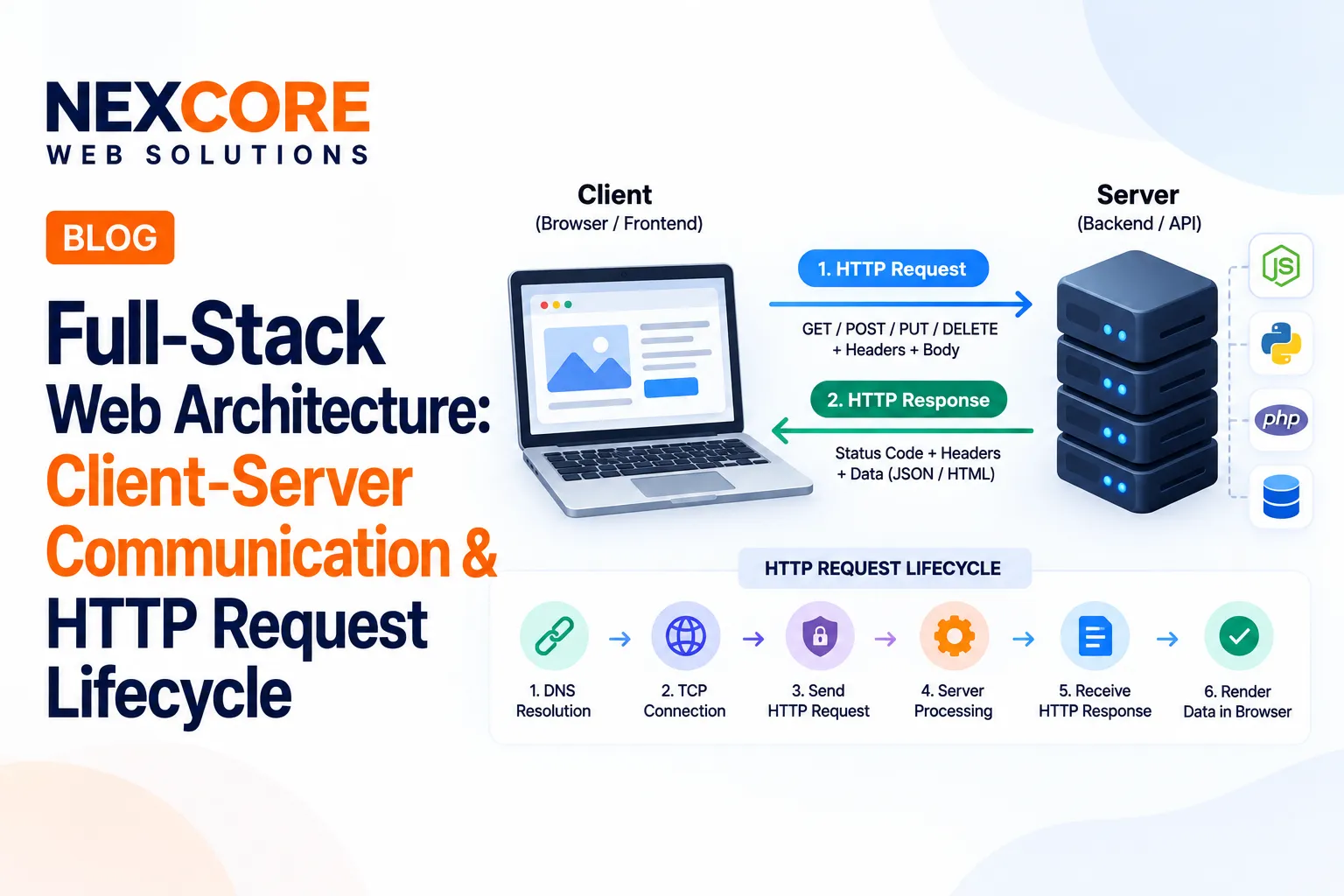
Client-server communication starts when the client needs a resource or wants the server to perform an operation. The client creates an HTTP request containing information such as the method, URL, headers, and sometimes a request body. The request travels through the network to the appropriate server, which processes it and creates an HTTP response. That response contains a status code, headers, and often content such as HTML, JSON, an image, or another resource. This request-response model gives frontend and backend components a predictable way to communicate.
Common HTTP Methods
HTTP methods describe what the client wants to do with a resource. GET is commonly used to retrieve information, POST usually submits new data, PUT or PATCH can modify existing resources, and DELETE is generally used to remove resources. For example, a product page may use GET to retrieve product details, while an administration panel may use POST to create a new product. Consistent method usage makes APIs easier to understand and maintain. Developers should still validate every important request on the server because browser-side validation cannot be trusted as a security boundary.
The HTTP Request Lifecycle
The HTTP lifecycle begins when an application needs a resource or backend operation. The browser prepares the request and may first use DNS to resolve the server’s domain name into an IP address. It then establishes the required network connection and, for HTTPS, uses TLS to protect communication before sending the HTTP request. Infrastructure such as a load balancer, web server, reverse proxy, or router may handle the request before it reaches application code. Each stage can influence performance, availability, and security.
Server Processing and Response
After the request reaches the application, routing determines which endpoint should handle it. Middleware may perform tasks such as logging, authentication, rate limiting, request parsing, or input validation before the main application logic executes. The server may then query a database, call another API, perform calculations, or update stored information. Once processing finishes, the application creates a response with an appropriate status code, headers, and body. The browser receives this response and may render content, update application state, display an error, or begin another request.
HTTP Status Codes and Error Handling
HTTP status codes communicate the result of a request. Successful operations commonly use codes such as 200 or 201, while redirects generally use the 300 range. Client-side problems may return 400 for invalid requests, 401 when authentication is required, or 403 when access is not allowed. Server-side failures commonly use 500-series codes. Good applications provide useful error information without exposing passwords, database details, stack traces, or other sensitive implementation data. Frontend code should also handle expected failures gracefully so users receive clear feedback.
Performance and Security
Full-stack performance depends on the entire request path rather than one individual layer. Developers can reduce unnecessary requests, optimize database queries, cache suitable data, compress responses, and serve static assets efficiently. Browser developer tools and server monitoring can reveal whether delays originate from network transfer, backend processing, or database operations. Security requires the same full-stack perspective because every client request should be treated as untrusted input. Servers should validate data, enforce authorization, use HTTPS, protect credentials, and apply suitable controls against common web attacks.
Practical Development Approach
When building a full-stack project, define API endpoints and their expected inputs and outputs before connecting the frontend to the backend. Document HTTP methods, status codes, authentication requirements, and common error responses so both sides follow the same contract. During development, use browser network tools to inspect request URLs, headers, payloads, responses, and timing. If something fails, check backend logs and database operations rather than changing frontend code blindly. Following the request from browser to server and back makes debugging much more systematic.
Conclusion
Full-stack web architecture becomes easier to understand when every interaction is viewed as a complete request-response journey. The browser creates an HTTP request, network infrastructure delivers it, backend components process it, and the server returns a response that the client uses to update the application. Each layer has a different responsibility, but reliability, performance, and security depend on how effectively those layers work together. Developers who understand HTTP methods, DNS, HTTPS, middleware, APIs, status codes, and database communication can diagnose problems with greater confidence. The most effective way to learn is to build practical projects, inspect real network requests, and follow each request through the complete lifecycle.
FAQs
What is full-stack web architecture?
Full-stack web architecture describes how the frontend, backend, database, APIs, and supporting infrastructure work together to deliver a web application. The frontend handles user interaction, while the backend processes requests and business rules. Databases store persistent information that applications need. Understanding these relationships helps developers design systems that are maintainable, secure, scalable, and easier to troubleshoot when problems occur.
What happens during an HTTP request?
During an HTTP request, the client identifies the destination and prepares a message containing a method, URL, headers, and optional body. DNS may resolve the domain, while a network connection is established before the request reaches the server. The server routes and processes the request, possibly communicating with databases or other services. It then returns a response containing a status code, headers, and optional content.
Why is HTTPS important in client-server communication?
HTTPS protects communication between a client and server by encrypting transmitted data and helping verify the server’s identity through TLS certificates. This reduces the risk of attackers reading or modifying sensitive information while it travels across networks. HTTPS is particularly important for login credentials, payment information, personal data, session cookies, and other confidential application traffic. Modern web applications should use secure connections throughout their production environments.
What is the role of an API in full-stack development?
An API provides a defined interface through which different parts of an application communicate. A frontend can call backend API endpoints to retrieve information, submit forms, create records, or update existing data. A well-designed API specifies methods, inputs, outputs, authentication requirements, and error responses. This separation allows frontend and backend components to evolve independently while maintaining predictable communication between application layers.
How can developers debug HTTP request problems?
Developers can start with the browser’s network panel to inspect the request URL, method, headers, payload, response status, and timing. They should then examine backend logs to determine how the server processed the request. Database monitoring may be necessary when slow or failed queries are involved. Testing an API endpoint separately can also isolate the problem and reveal whether it originates in the client, network, server, or database.




